Participant
January 17, 2019
Question

problem with h264 color space

  • January 17, 2019
  • 2 replies
  • 441 views

Hello,

i'm just getting stuck with this so i decide to write here.

i have an animation exported in after effects (.mov QuickTime - animation codec)

everything look good and text is quite legible

when i export it from premiere pro the text in the video look like i've applied an unsharp mask

(i've change the bg just to try if the problem was the full white bg)

this is the export setting in premiere
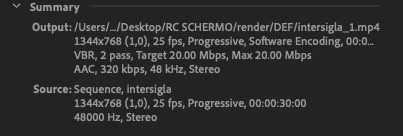
i just try different way to export the file but the result is always the same.

and i can't use the .mov format and the codec should be h264

thanks in advance,

Davide

This topic has been closed for replies.

2 replies

Legend
January 17, 2019

I wonder if you're seeing the unavoidable result of a 4:2:0 color space.

Vinay Dwivedi
Adobe Employee
Adobe Employee
January 17, 2019

Hi A&S Team,

Quicktime animation supports alpha channel but h.264 does not. So, this might be one of the reason for it.

//Vinay

Participant
January 17, 2019

hello and thanks for the quick reply.

i'm not using alpha channel. it happen on text and on vector file,

psd and native shape of after effects don't seems have this kind of unsharp mask

Vinay Dwivedi
Adobe Employee
Adobe Employee
January 17, 2019