
Markj1123
Participant
May 14, 2020
Question

Problem with jpegs in Premiere Pro

  • May 14, 2020
  • 1 reply
  • 563 views

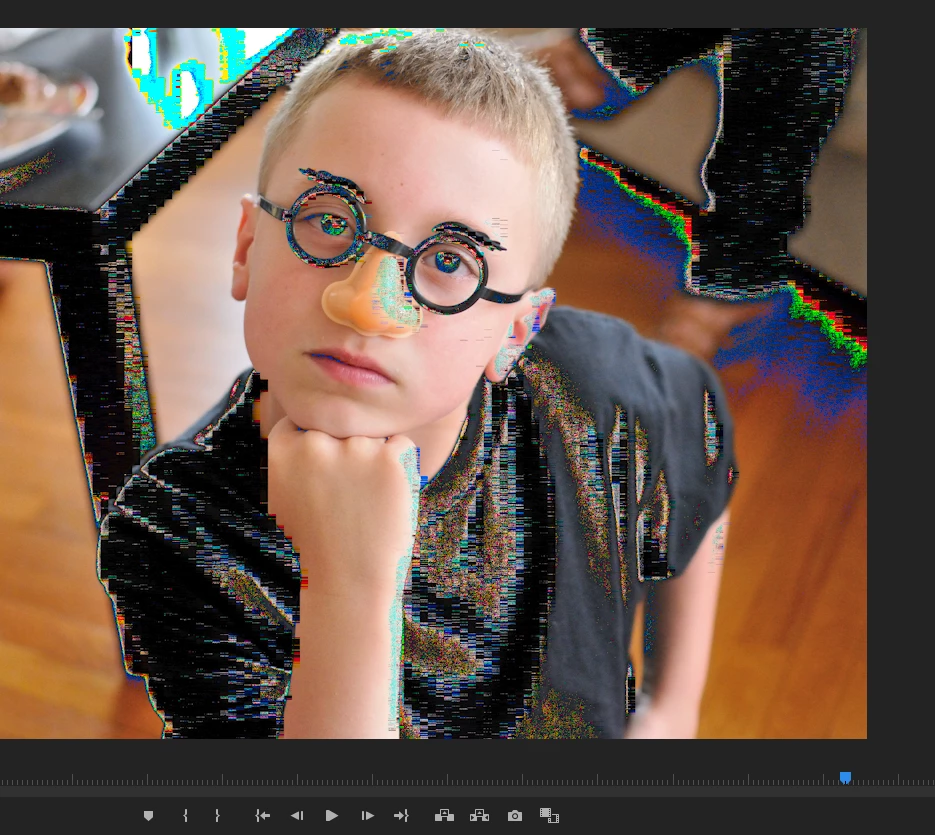
When I add jpegs into premiere pro, most of them look like the photo below.  The video is ok...it's just the photos.  They look normal in any other program.  They even look normal while viewing in the Media Browser.  Occasionally, they look also look ok while creating the project, but then look like the photo below once it's been exported.

Any ideas??


Thanks,

Mark


This topic has been closed for replies.

1 reply

R Neil Haugen
Legend
May 14, 2020

Probably a wrong color space on the image. Premiere needs sRGB ... no 'straight' RGB, ProPhoto or other color space will normally work correctly. A standard suggestion is to open the image in Photoshop, set the image 'space' to sRGB, and export.


Neil

Everyone's mileage always varies ...
Markj1123
Markj1123Author
Participant
May 21, 2020

Thanks for the reply. I checked these photos and they are all sRGB already. 


Any other ideas?


Thanks. 

Averdahl
Community Expert
Community Expert
May 21, 2020

Open the photos in Photoshop and save them as .psd.


If you have many photos you can in Photoshop batch convert many files in one go by going to File > Scripts > Image Processor.