Participant
November 30, 2022
Answered

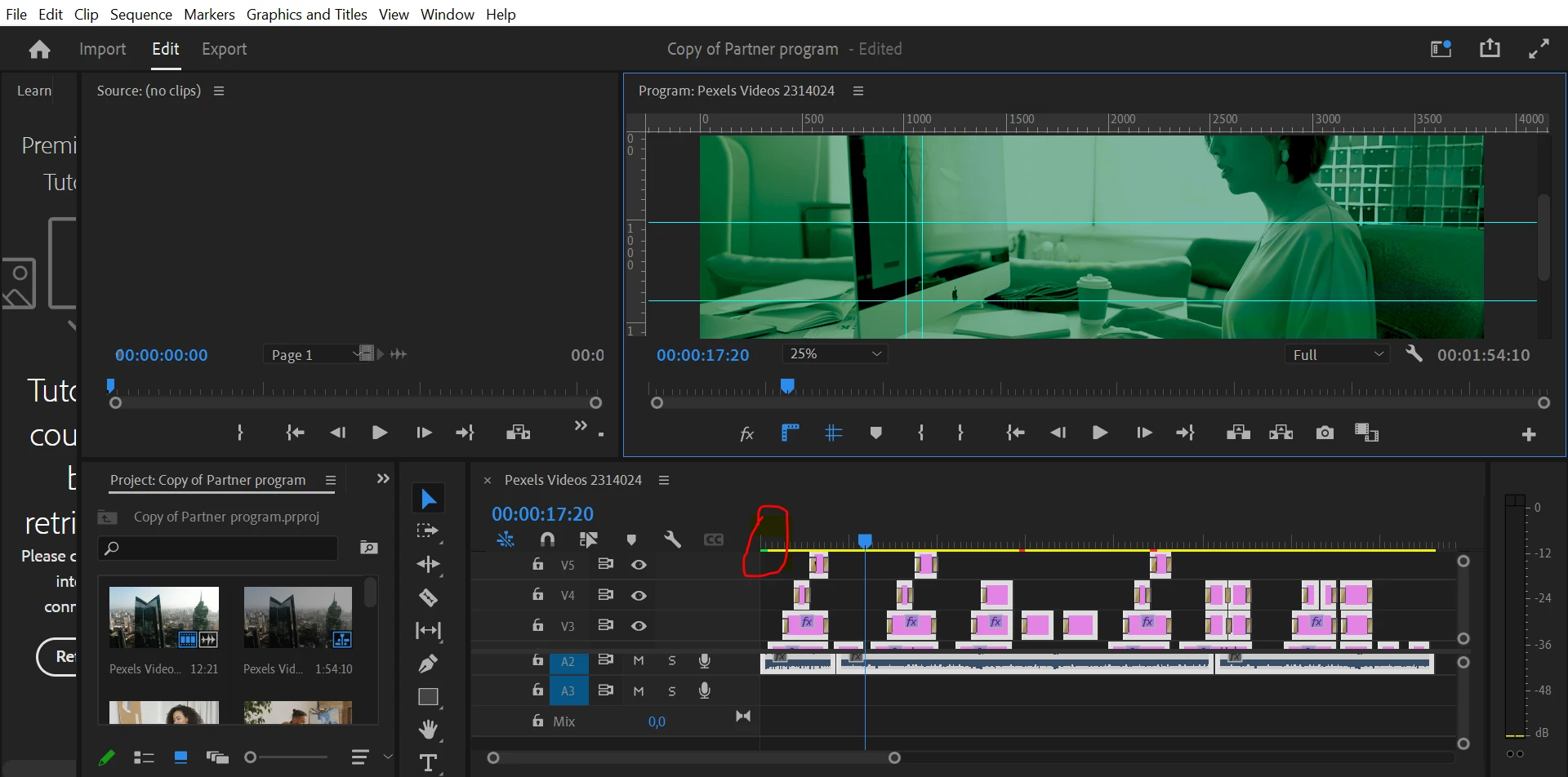
Problem with my program monitor showing green on all videos

  • November 30, 2022
  • 2 replies
  • 2180 views

Hello everyone,


Please does any body know how to fix this problem on adobe première pro ?

I am faced with this issue of green on my video editing so I cant see the actual color it's really complicated to work like this especially when you need to adjust the color matt of your different videos.


Please someone help me please it's been like 4hours now am searching for tutorials.

Thanks to all in advanced.


This topic has been closed for replies.
Correct answer Kevin-Monahan

Hello Kevin,


Thanks, for your reply, just did as you said but still no remedy. I download theAMD.....  and reboot my pc but still nothing.


see below picture, the part I circled there are actually two sections the one in green in green has the actual video and as from the yellow part it all again becomes greensih.


Please tell me that we would find a way because I really need this for my video creation it's a project am working on. It's late but won't sleep until I have a psotive responds. Please help me, thanks in davance.


Hi Helena,

Great. Thanks for trying that with your AMD GPU. Sorry, it didn't work. Can you give us a bit more info about your CPU? Is it an Intel CPU or one from AMD? Which model is it? Are you sure you do not have an NVIDIA card installed in addition to the AMD one? Sorry to ask so many questions. 


A clean reinstallation of AMD Drivers may help: https://www.amd.com/en/support/kb/faq/gpu-601


Thanks,

Kevin 

2 replies

R Neil Haugen
Legend
November 30, 2022

At this time, MANY Nvidia drivers are screwy. The only solid one seems to be the 517.40 STUDIO driver from their "older drivers" listing.


Neil

Everyone's mileage always varies ...
Participant
November 30, 2022

Hello Neil,


Thanks so much for your answer, but I don't really understand could you be more precise ?


Kevin-Monahan
Community Manager
Community Manager
November 30, 2022

Hi Helena,

Sorry for the frustration. I looked at your screenshot, and it appears you have an AMD GPU. You can find updated drivers for your GPU here: https://www.amd.com/en/support.


Does that make more sense? Install an updated driver, reboot the computer, and restart Premiere Pro. Is everything OK now? Let us know.


Thanks,
Kevin

Kevin Monahan - Sr. Community & Engagement Strategist – Pro Video and Audio
Community Expert
November 30, 2022

Please check that your Video Card Drivers are up to date.

Participant
November 30, 2022

Hello 


Thanks so much for your reply am just replying now because I was searching on how to adjust it.

It says from my research that everything is upto date 

So now what's next ? I have been watching tutos but none speaks of my problem.

I wenet to file, project settings...

And checked sequence, sequence settings...


But now am more than lost I feel sad please can you guide me ?