
Participant
November 23, 2023
Question

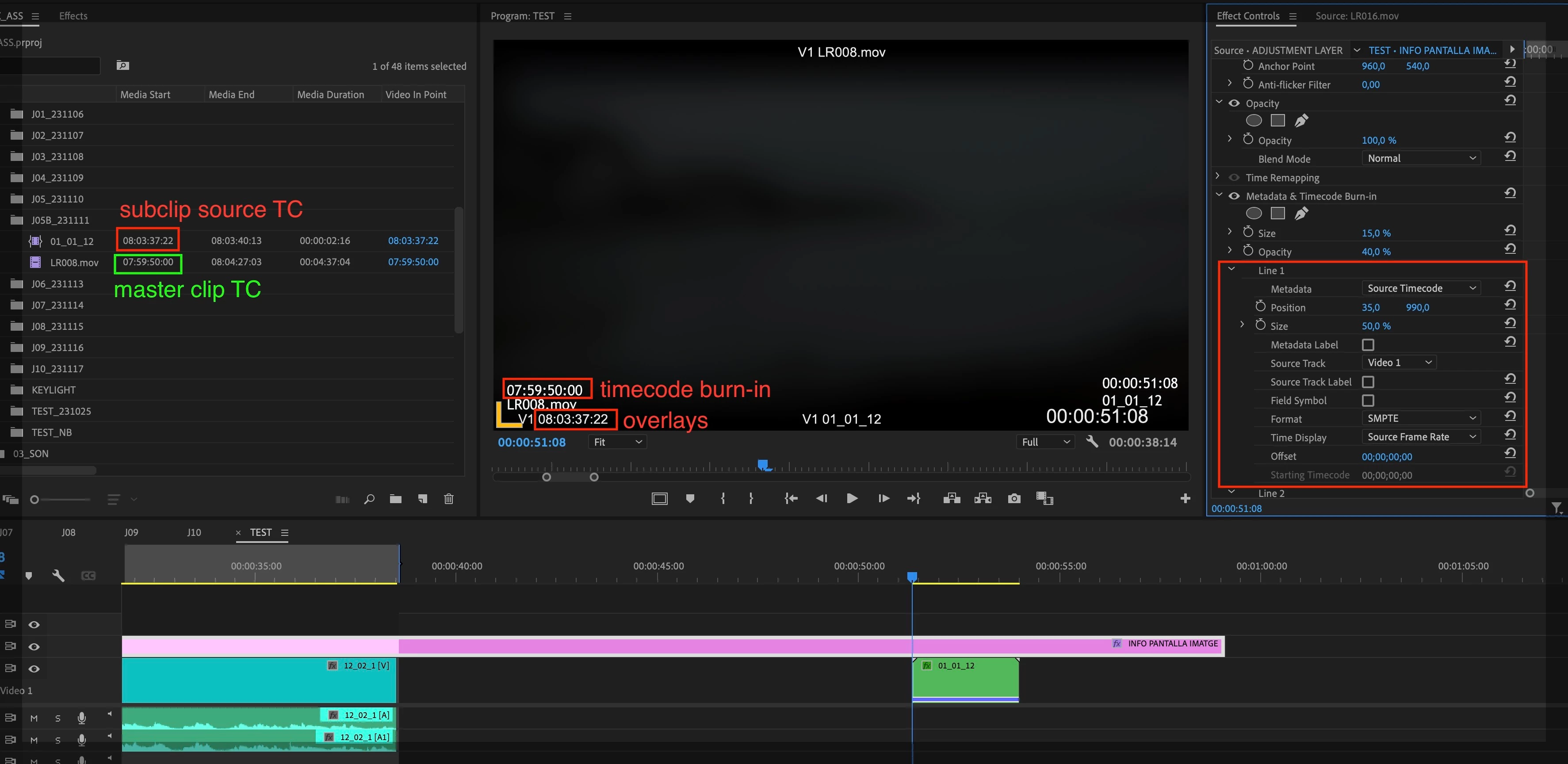
Problem with TC in Metadata & Timecode burn in with subclips

  • November 23, 2023
  • 1 reply
  • 128 views

I have to create subclips for my project and when I burn the time code to send the video to the lab with Metadata & Timecode burn in, the TC burned is not the same of the subclip one. For example, at the begining of the subclip instead of the begining of the subclip TC it apears the begining of the master clip TC. If I export an EDL I don't have this issue. And if I use the function overlays I don't have the issue either (but I don't know how to export a video with the overlays burned in the export). How can I do to see in the TC burned in the real TC of the subclip instead of something else? I atach a screen shot.
 

This topic has been closed for replies.

1 reply

Kevin J. Monahan Jr.
Legend
December 7, 2023

Hi @Marina33580000sxaf,

I got your message. I apologize that the that the community was unable to solve your issue. Please contact assisted support for continued assistance with this issue. To contact Adobe Customer Service, do the following: 


  1. Make sure to sign into your Adobe account. Allow popups and cookies on your browser. You may not be able to see the chat window if using a VPN. 
  2. Click here: https://helpx.adobe.com/contact.html?rghtup=autoOpen. This will automatically open the chat window. 
  3. Type "Agent" in the chat box to be connected to a live agent. 
  4. When you get an agent, ask to be connected to the video queue. These are agents that are specially trained to handle issues related to digital video and audio.


I hope they can help you. Let us know what they say so that the community can stay informed and help others having trouble with the same situation.


Thanks,
Kevin

Kevin Monahan - Sr. Community and Engagement Strategist – Adobe Pro Video and Audio