

saruproduction
Participating Frequently
April 11, 2023
Question

Probleme d'export

  • April 11, 2023
  • 8 replies
  • 286 views


Bonjour j'ai probleme lors de l'exportation de mon projet.

J'ai mis à jour premiere pro. J'ai effacé les caches.

Aucuns probleme avec mes fichiers filmé avec mon appareil photo.

Chemin d'accès au fichier : D:\Sourire à la vie\Shooting Hopital\MVI_9111.MP4
Type : Séquence MPEG
Taille du fichier : 122,98 Mo
Taille d'image : 3840 x 2160
Fréquence d'images : 25,00
Format audio source : 48000 Hz - Compressé - Stéréo
Format audio du projet : 48000 Hz - 32 bits en virgule flottante - Stéréo
Durée totale : 00:00:08:15
Rapport L/H en pixels : 1,0
Alpha : Aucun
Espace colorimétrique : Rec. 709
Remplacement de l’espace colorimétrique : Désactivé
LUT en entrée : Aucun
Type de codec vidéo : MP4/MOV H.264 4:2:0 (Plage entière)


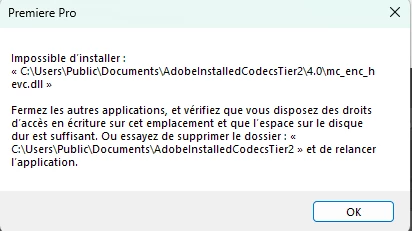
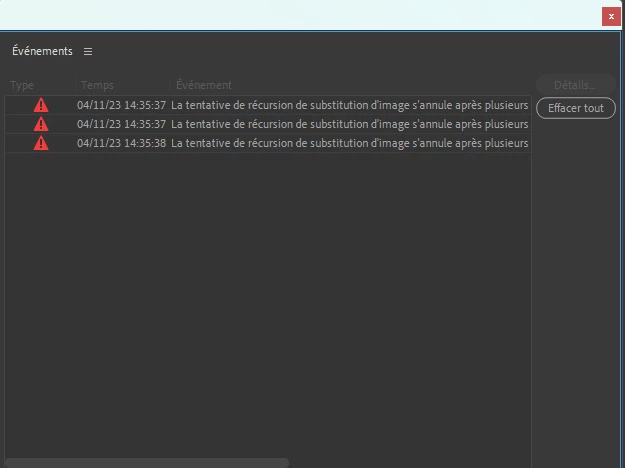
Par contre avec fichier Gopro ou drone sa plante systémathiquement.

Les fichiers sont en HEVC


J'ai installer le codec sur mon ordinateur. Rien ne change


Aidez moi SVP


This topic has been closed for replies.

8 replies

Legend
April 11, 2023

you've tried smart rendering?  and transcoding to a different format?  and still getting the error message?  You might try creating a new sequence and copying the contents of the problematic sequence into the new sequence.  

saruproduction
Participating Frequently
April 11, 2023

J'ai essayer les solutions apportées mais rien ne change

Legend
April 11, 2023

thanks for the info...  Can you answer both my and Carlos' questions and suggestions in a systematic fashion.  Never easy to troubleshoot from a distance in a scattershot fashion.  Sometimes you may think that the suggestions are to complicated, time-consuming, etc.   so if you choose not to try something, let us know... But I'm great believer in workarounds...   and sometimes a successful workaround can help us find a simpler solution.

saruproduction
Participating Frequently
April 11, 2023

Plus précisément


saruproduction
Participating Frequently
April 11, 2023

Voila mon systeme


Legend
April 11, 2023

unfortunately the translate feature doesn't seem to be working as well as it should...  and my french isn't up to the challenge.  

You're having problems with hevc material?  We see reports of problems with gopro material... Have you tried "smart rendering?"

https://community.adobe.com/t5/premiere-pro-discussions/faq-what-is-smart-rendering/td-p/10648488

And always a good idea to let us know your system specs: OS version, Premiere version, amount of RAM, Hardware specs including graphics card.

You might try transcoding your hevc material to a more robust "mezzanine" format like the appropriate flavor of prores and then making the hevc material offline and then relinking to the transcoded material 


saruproduction
Participating Frequently
April 11, 2023

Ou puis-je trouver la séquence de formulaire des fichiers de rendu ?

Community Expert
April 11, 2023

try to delete render files form sequence (video previews)

make sure your sequence settings and export settings match for better results.

try to export to QuickTime GoPro Cineform YUV 10 bits, then do H.264 from that.

check if your export is using hardware or software encoding when doing H.264