
Processed Audio Levels All Over the Place...
I'm at a loss here (pun intended) on PrP v24.0.0 Build 58, Windows 10.
Since updating to V24.0, the audio presets within PrP seem to be misbehaving. I have trashed the preferences and reset my audio drivers.
I'm recording on a pair of Sony cameras. The audio is a RODE NTG-1 recorded into a FS5 and levels are hovering around -10 to -12 during capture. A Sony A7s-II is a B-cam with a scratch audio track for sync. In PrP, I import and sync the tracks, using the FS5 audio for the edit. In the past, when I applied the "Dialogue->Balanced Male (now Balanced Low Tone) Voice" preset, I would get a general starting point for EQ and the clip would normalize to -6dB in the timeline.
Now, when applying this preset, some clips normalize to -6dB, some to -18dB, even if they are cuts from the same take and cameras. For example:
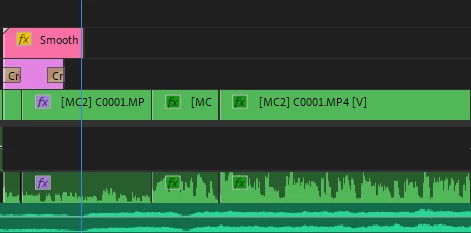
Here, the first two cuts from this clip normalized to -18dB, while the second two cuts normalized to -6dB. I've tried clearing the audio presets from all and re-applying both individually and as a group, and it seems to apply the normalization at random. When cutting an interview with dozens of edits, this is both frustrating and extremely time-consuming to go in and individually adjust the gain level for each cut.
I also tried applying the audio effects to the entire multicam clip before the edits, and as soon as I start moving things around in the sequence, the audio mismatch pops back up.
Is there something else I can do to reset the effects? Is this a bug in the new effect presets?
 AdChoices