
Whiskey#4008
Participant
August 19, 2020
Answered

Program bar has disappeared

  • August 19, 2020
  • 3 replies
  • 13135 views

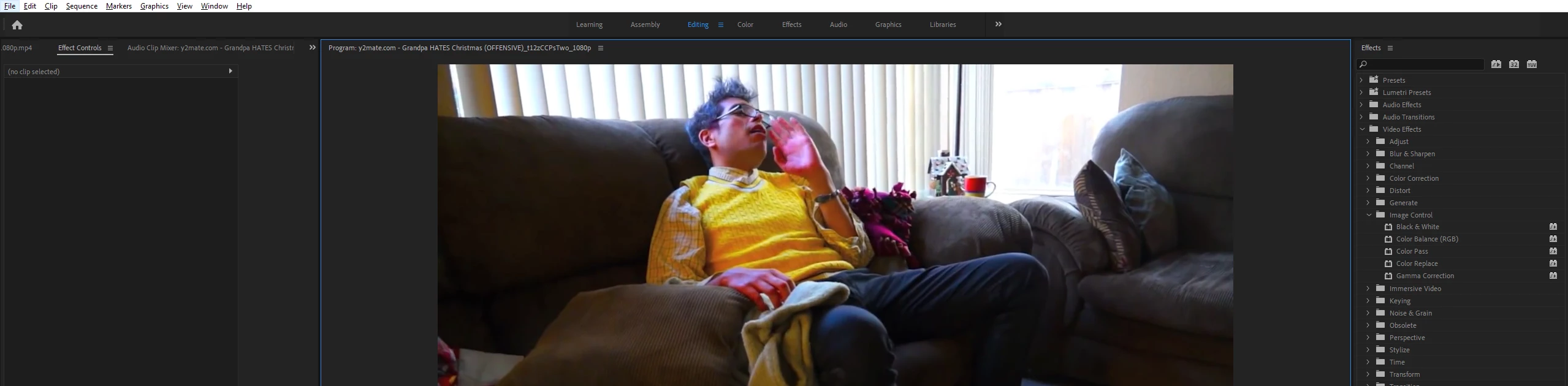
Whilst editing another video, I've accidentaly hit a shortcut which I did not know about which has made the program bar at the top disappear completely. I can't seem to find a way to get it back. I've tried CTRL+L, CTRL+/, as well as the previous shortcuts with LSHIFT. Resetting my workspace did nothing either. Here is an image of what is missing

Thanks

This topic has been closed for replies.
Correct answer MyerPj

The hotkey you are looking for is ctrl+\


Maximize your PP Window then press ctrl+\


You can press ctrl+\ twice from a non-maximized window and First press it will maximize and second press it will eak out a little bit more real-estate and remove the title bar.

3 replies

Whiskey#4008
Participant
August 19, 2020

Thank you! It's been such a hassle trying to get the progam bar back

MyerPj
Community Expert
MyerPjCommunity ExpertCorrect answer
Community Expert
August 19, 2020

The hotkey you are looking for is ctrl+\


Maximize your PP Window then press ctrl+\


You can press ctrl+\ twice from a non-maximized window and First press it will maximize and second press it will eak out a little bit more real-estate and remove the title bar.

Richard van den Boogaard
Community Expert
Community Expert
January 21, 2023

Thanks! Took me quite a search to find this solution. Any idea how to disable this key combination? I can't seem to change it in Keyboard Preferences...

gerikp
Community Expert
Community Expert
August 19, 2020

Your subject line says "Toolbar has disappeared" and if that's indeed what you are missing then you should be able to bring it back by clicking on the "Window" menu in Premiere Pro and pulling down to "Tools" and it should reappear.

Whiskey#4008
Participant
August 19, 2020

I've updated the title to what it should be 
My tool bar is fine, it's the top bar that's gone