
derricklytle
Participating Frequently
March 1, 2019
Question

Project Manager Crashes

  • March 1, 2019
  • 6 replies
  • 3777 views

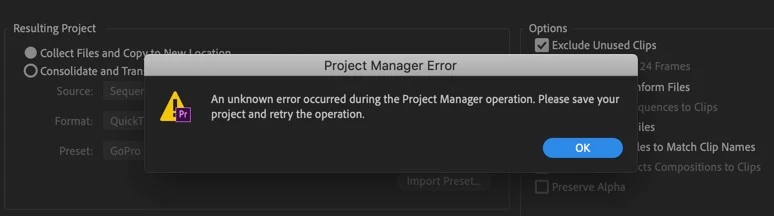
In 2018 and 2019 I've tried using he project manager to save projects to move drives. 99 percent of the time I get an error. This is incredibly frustrating. Happens on my MacBook, work iMac, and home PC.

I've tried saying to desktop, external drives, etc and always the same issue. Yes, the drives have enough space for the project.

So what gives, adobe? It's been a consistent issue for well over a year and it's never resolved.

I really wish developers would stop adding useless bloat and fix the the countless bugs here.
This topic has been closed for replies.

6 replies

hellopaul4
Inspiring
February 25, 2022

Three years later, and I still don't think I've EVER got Project Manager to work - PPro spends AGES (like 10-20 minutes) supposedly copying a few GB of files, then I get that stupid "An unknown error occurred" EVERY time (yes, I have plenty of disk space - 550GB free, 37GB* of files to copy, no I'm not saving it to a file location many folders deep, and I've tried 'Exclude Unused Clips' on and off). It's very frustrating having to manually find EVERY bit of footage I've used in my project and copy it when handing over a project. Has anyone ever managed (pardon the pun) to get Project Manager to work?

I'm waiting for PPro to crash again, and have noted that the folder it's copying to is 90GB and growing.....just before it crashed again. Right - time to admite defeat, and acknowledge that "Proejct Manager" might as well be called "Project Destroyer" and do it all manually then somehow try to reconnect all the media. That'll be a couple of hours of my time well spent.

R Neil Haugen
Legend
February 25, 2022

Totally understand the frustration. The engineers should provide a full manual on the Project manager alone, in my view. I've talked with them in person at NAB/MAX events, listened in on others asking about PM troubles, and seen a number of engineers responding on this forum over the years.


From all I've heard and read, there are A TON of picky little things that:

1) need to be done in creating the project

2) need to be done in metadata

3) can't be done unles you also did X, Y, and Z

4) can't be done with P, Q, and R media types.


IF you somehow know all the rules, whys/wherefores and limitations, you can use the Project Manager "for what it's actually designed to do" ... which seems to be a bit less than many of us users would like to use it for.


And you are also correct in that it hasn't been made much easier over time. Sadly.


Maybe @mattchristensen or @Wes Howell  might be able to provide some assistance.


Neil

Everyone's mileage always varies ...
hellopaul4
Inspiring
February 25, 2022

I think the problem could have been that I had the utter cheek to use RED .R3D files; from hunting around for a cure, I found many people lamenting the uselessness of Project Mamager when it encounters such an unusual, rarely used format 🤣.

So I installed Plume Pack (for free), guessed how to use it (the instructions on the website are USELESS!) and seamlessly exported the whole lot. I shall never use Project Manager again! 😁
https://www.autokroma.com/PlumePack/


May I suggest to Adobe that they ask the Plume Pack authors how they managed to do what Adobe has failed to do after many, many versions of PPro? Or just license the code and bundle it with PPro?

Participant
October 15, 2019

Same here! Crashing every time I try to open Project Manager. Latest updates intalled.

Participant
December 30, 2019

Same here!! Premiere crashes every time I try to open project manager. Some weeks ago I transcoded a project and ended up with an insane file size, many times the original project (the idea was to shrink it). I then deleted the transcoded project and since then premiere has crashed every time i try to open the project manager.

R_N_C
Known Participant
October 2, 2019

I can't even get the Project Manager to come up before its crashville.

Participant
July 31, 2019

Same problem here!

ervzman
Participating Frequently
March 22, 2019

Having same issue. It will freeze at 'Analyzing Project'. Assets are located on an office file server, probably that was causing it?

Kevin-Monahan
Community Manager
Community Manager
March 1, 2019

Hi derricklytle,

Tell us more about the projects you're trying to move. Are they very complicated? Many sources? AE Projects? What do you think you might be tripping up on?

Thanks,
Kevin

Kevin Monahan - Sr. Community and Engagement Strategist – Adobe Pro Video and Audio
derricklytle
Participating Frequently
March 1, 2019

This was one sequence from a project. The sequence I attempted to save was only 3 minutes long, no dynamic linking. Just Prores files, GoPro, and some very basic graphics. All from one SSD.

I have this issue on all my projects using windows and Mac. All OS are up to date and all apps are up to date. It's insane.

Community Manager
March 1, 2019

Do you happen to have a long file path (Destination Path) that you are saving to? If that is not it, another thing to try is to uncheck "Include Preview Files"