



Paul_WTVT
Known Participant
January 29, 2026
Question

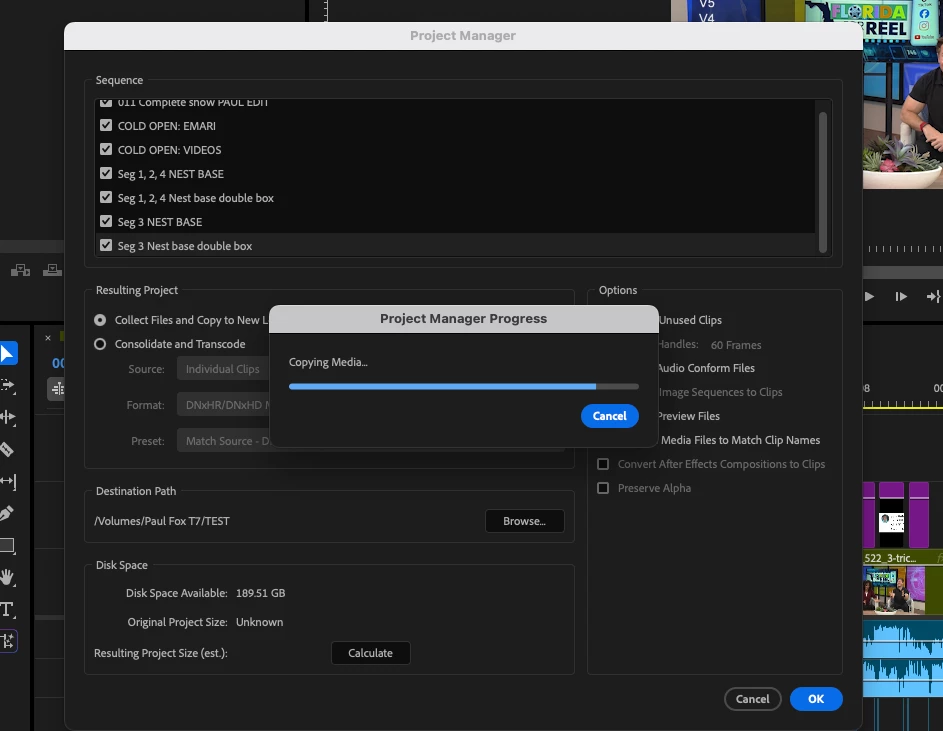
Project Manager hangs & progress bar halts without specifying which (if any) file is causing the error

  • January 29, 2026
  • 9 replies
  • 126 views

Premiere Pro 25.6.4

Sequoia 15.7.3

Am trying to Project Manage a project to pass along to another editor, but every time it hangs with the progress bar at whatever % that looks to be

Wondering 

  • how best to troubleshoot what’s causing the issue
  • why Adobe doesn’t have a more detailed progress bar which could identify/ flag troublesome files 
 

    9 replies

    Odobe
    Known Participant
    August 20, 2026

    This does happen...

    Have you tried exporting the same sequences that you are looking to project manage as a standalone Premiere Project first?

    Then from this new project it should have cleared out any unused files. 
    Then check after your out-points in each sequence for any leftover clips that could be hangovers.
    Check if you have proxies attached perhaps and if they are contributing to it failing.
    You should also be able to clearly see if there are any outlier file types in the project.

    Participating Frequently
    August 4, 2026

    I’m having the exact same problem. No cloud drives. Did you find a solution?

    Paul_WTVT
    Paul_WTVTAuthor
    Known Participant
    August 14, 2026

    No- when I’ve needed to pass projects along I’ve found it quicker to simply put all the assets and project on an SSD, and haven’t tried again since

    Peru Bob
    Community Expert
    Community Expert
    January 30, 2026

    Try creating a new project and import the old one into it.

    Then try the Project Manager.

    Paul_WTVT
    Paul_WTVTAuthor
    Known Participant
    January 30, 2026

    Thanks yes I actually tried that as a last ditch attempt with the same result (this screenshot is from that final attempt before I gave up and just collected all the project files onto one drive manually)

    Peru Bob
    Community Expert
    Community Expert
    January 30, 2026

     onto one drive 

    That’s probably the issue.  Premiere Pro doesn’t like files in OneDrive.