Participant
June 24, 2017
Answered

Project Manager Premiere Pro will not work?

  • June 24, 2017
  • 1 reply
  • 1577 views

Hi,

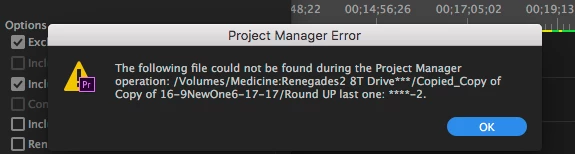
I've tried 12 times to get Project Manager to work and I keep getting this:
    This topic has been closed for replies.
    Correct answer R Neil Haugen

    Hi Neil,

    I Did the Save-As - renamed the project file and saved to my hard drive re-booted and tried to Media manage again and I keep getting this even though I changed the name of the file.

    <https://forums.adobe.com/servlet/JiveServlet/showImage/2-9668686-1237117/ScreenShot2017-06-24at2.52.32+PM.png>

    Any suggestions would be very appreciated. Is there a direct link to contact support at adobe?

    Thank you,

    James


    They do have both phone and "live chat via web" options, they've got this new help system where it tries to identify what Adobe apps you've got and directs you to appropriate help. If you get into that, there's a place you might need to hunt for on the page to have it look for your CC apps, then you can select PrPro, and then Live Chat ...

    Go here ...

    Contact Customer Care

    Click the Adobe Creative Cloud box, then you should see Premiere Pro, click that ... then on that page, scroll down & select "Troubleshoot" ... then scroll down, "Show me my contact options" ... then choose either phone or chat.

    Either one, as soon as you get a live person ... ask for the Video Queue! The main help system is 'generalist', but they do have some who have more specific background/experience in the video apps. Make sure they send you to that group.

    Neil

    1 reply

    R Neil Haugen
    Legend
    June 25, 2017

    That's a strangely named file there ... where does it reside? It might be a drive-permissions issue.

    Neil

    Everyone's mileage always varies ...
    Participant
    June 25, 2017

    Hi Neil,

    Thank you for your response and good questions about where does the file reside.

    It appeared to me all my files were being saved in my project hard drive and copying to Adobe Premiere Pro Auto-Save on the Drive.

    A couple of weeks ago while I was editing a large documentary project Premier crashed. I was on-line and I received a message that Adobe had

    managed to save the file and data from the crash. I used the file that Adobe saved and then started using that as my master project file.

    However when I go back into Auto Save, it does not seem to be saving many of the up-dated Saves of my files. Then a week ago I had the same crash happen

    and Adobe send me a copy of the Copied file. I still open the documentary project with the Copy of the Copied saved file. when I hit save I’m not finding versions

    of it in Auto Save . . .

    Is adobe saving the master project file it in the cloud? and how would I find it? Or what else would be the problem?

    I greatly appreciate you support with this.

    James

    R Neil Haugen
    Legend
    June 26, 2017

    I'm not quite sure what is going on there ... but if you can get the project opened, I would do a Save-As where you rename the project appropriately and also put it in a specific file on your drive.

    Neil

    Everyone's mileage always varies ...