
Participant
September 11, 2018
Answered

Project panel clips not sorting in correct order

  • September 11, 2018
  • 3 replies
  • 1710 views

I would like to sort the project panel clips in the order they were recorded on my camera.

If I view the clips in list view I can sort them by creation date. However, then they do not show any form of preview so it can be hard to see what clip is what.

If I view the clips in icon view I can see a preview but the clips are sorted in a very random order, I would like if the clips could be organized by the time they were recorded when viewing them in icon view.

Is this possible? As a workaround, I have simply organized the clips in a windows explorer folder and drag them into the timeline. It works but is not as efficient as doing it all in premiere pro.
    This topic has been closed for replies.
    Correct answer Mike Dziennik

    3 replies

    Participant
    September 25, 2024

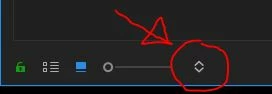
    Mine weren't sorting no matter which sort option I chose so I found a fix : Click the sort menu, select sorting List View Order at the top, and then select your sorting mode (I use Media Name). This worked for me. Version 24.0.0

    R Neil Haugen
    Legend
    September 11, 2018

    Mike shows the search order listing thingie. Use it.

    Setting the search order in one view does not set the order in both. So setting in List view has no effect on Thumbs view. You set each as you wish.

    Neil

    Everyone's mileage always varies ...
    Mike Dziennik
    Community Expert
    Mike DziennikCommunity ExpertCorrect answer
    Community Expert
    September 11, 2018

    Known Participant
    November 14, 2019

    Oh my goodness. What an obscure place to put it but thank you!