Participating Frequently
December 19, 2017
Question

Project Panel Thumbnail view not showing poster images

  • December 19, 2017
  • 1 reply
  • 348 views

I am using the thumbnail view in the Project Panel, and it shows a poster image for only a few assets. The rest show the yellow "Media Pending" image.

I went through and reassigned a poset image for everything, then when I restarted Premiere the next day, they were gone again.

This started after sharing this project with another editor who did all of the color correction. This was done while I was also still in the project editing.
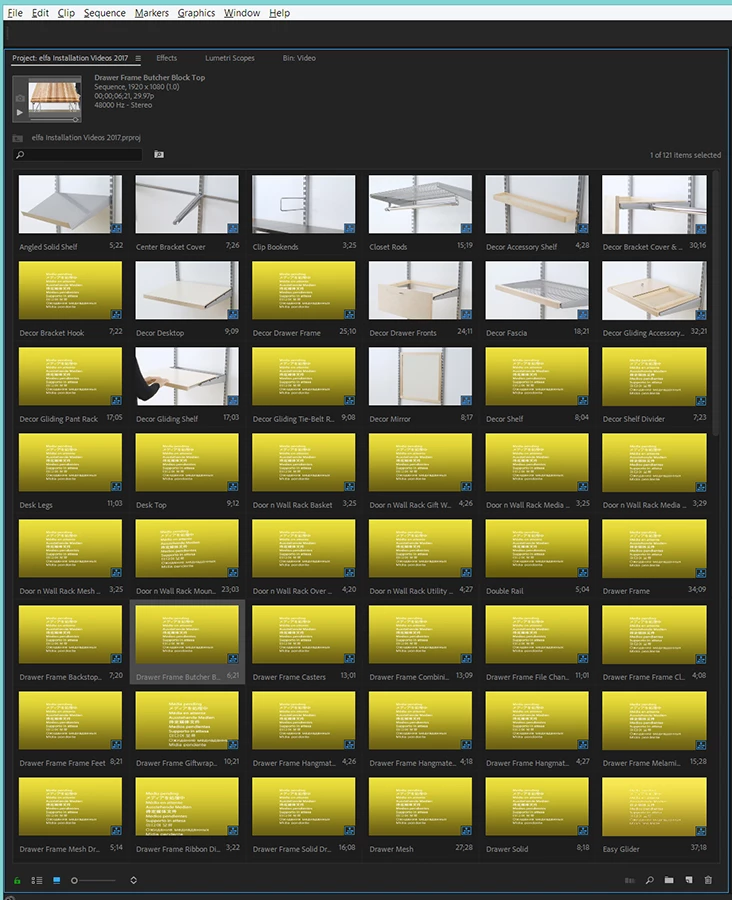
Any help would be appreciated.

Thanks,

Kevin

Premiere Pro CC 2018 v 12.0.0 (Build 224)

Windows 8.1 Pro 64-bit

64GB RAM

Intel(R) Xeon(R) CPU E5-2660 v3 @ 2.60GHz  x2

NVIDIA Quadro K4200  x2

This topic has been closed for replies.

1 reply

Legend
December 20, 2017

I'm not terribly familiar with shared projects.  Has the other editor released the lock?

klmarlowAuthor
Participating Frequently
December 20, 2017

I don't believe you have to release the project. At least my understanding of the new version is that multiple people can be working on a project at the same time. It never prompted to do anything while we were doing this.

I can honestly say, though, that I haven't read or seen anything on the exact procedures for doing this, if there are any.

Legend
December 21, 2017

I may have it wrong, but I thought while multiple people can have the same project open at the same time, working with media in a bin or a timeline locks it to the other person until released.

So you can work on sequence A while John works on B, but you can't work on B till John releases it.

I could be wrong, but...might be worth looking into.