Participant
February 23, 2020
Answered

ProRes 422 HQ 1080p 25 fps 1080i/50

  • February 23, 2020
  • 3 replies
  • 11772 views

Hi guys I need some guidance in my workflow. We need to output a project in this setting.


We're shooting with Blackmagic cameras at ProRes 1080p 25 fps, but I can't seem to find a way to export to 1080i/50 or create a timeline in those settings. Screenshots will help a lot. Thanks everyone!


Pete

Correct answer Warren Heaton

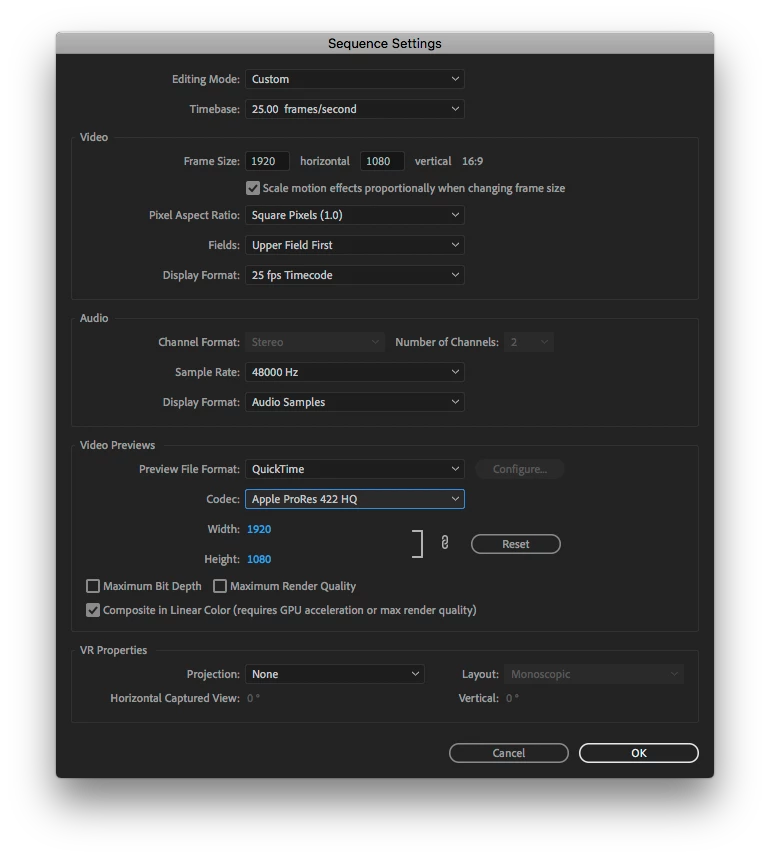
Here's a screen shot of what should work.


Send a test file to your broadcaster/cable company.  I've had 30p forced to i60 fail quality control due to no temporal difference betwen the fields on a documentary; however, that was for streaming.

3 replies

Warren Heaton
Community Expert
Warren HeatonCommunity ExpertCorrect answer
Community Expert
March 2, 2020

Here's a screen shot of what should work.


Send a test file to your broadcaster/cable company.  I've had 30p forced to i60 fail quality control due to no temporal difference betwen the fields on a documentary; however, that was for streaming.

Participant
March 3, 2020

Thanks for this! 

Inspiring
February 23, 2020

Everything AWH11 has said and yes 'upper field' first. I'm in Australia and I've yet to see a lower field first HD format. All broadcast deliveries I create or receive come in as upper field first at the TV Network I freelance at.


If your project is entirely frame based (like your camera) is there a reason you want to output at 50i?

If it's for broadcast I understand but if it's not ...?

Participant
March 2, 2020

It's for broadcast so we decided to shoot it in 25 fps pro res hq, edit in that format then get it interlaced in media encoder for delivery. What do you think of that workflow? Did I miss anything?

Inspiring
March 2, 2020

I've not tried it that way (encoding in Media Encoder to interlaced output) but can't think of any reason it wouldn't be fine. Next time I'm in an online suite I'll test it out. That won't be for while though.


Mostly everything for broadcast in Australia is shot 25p (except news, sport and live stuff). The only difference in workflow that the network I work at does is: even if something is shot 25p we still edit in an 'upper field' first Premiere Pro sequence.

Legend
February 23, 2020

Hi Pete,


Timeline: It's probably just best to start with a "Custom" editing mode and build this out yourself. Set your timebase to 25fps, 1920x1080, Square Pixels, and most importantly to achieve your interlaced deliverable, set Fields to Upper or Lower Field First. Specifically, I think you will be using Upper Field First, because I believe PAL/50Hz frame rates have always been Upper Field first (I think it was just NTSC DV tapes that were Lower First) but I'm not 100% sure on this. Just double-check I suppose with what your intended delivery is. Set the rest of the settings as you like. For your Preview File Format, you could opt to also use ProRes 422HQ to match your source footage. It will run great but your preview files will take up more space compared to a smaller codec. Up to you. Again, this is just for previews. It can make your final render faster if you opt to Use Previews on final export but personally I prefer to not use previews though for final exports.


Export Settings: What is your intended export codec. Is it also ProRes 422HQ? H.264? If you have the latest version of Premiere, you can actually opt to deliver ProRes 422HQ in a .MOV or .MXF wrapper. I digress, whatever export format you need, select that. Then in the video settings tab, make sure that Resolution is 1920x1080, Frame Rate is 25fps, and Field Order is Upper First (or whatever your timeline is). You could alternatively check the "Match Source" boxes for these assuming your timeline settings are correct. Set everything else the way you need it to be.


Participant
March 2, 2020

Thanks for this helped me a lot!