JonasFedderWitt
Participant
November 8, 2021
Answered

Proxies - no automatic relink i 2022-update.

  • November 8, 2021
  • 21 replies
  • 20139 views

Hey everyone


When i try to use the "Relink others automatically"-function with "Media Start" under "Attach proxies" it's doesn't seem to work.

So i'm stucked with relinking every clip individually...


Worked fine with the 2021-version.


Anyone else have the same problem or have the solution for it?


Correct answer Robbie. W

Ok so I just figured out a quick enough work around for this!

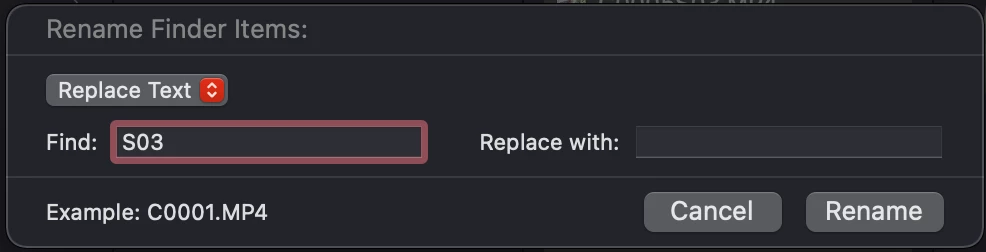
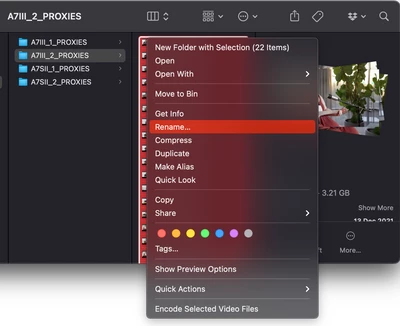
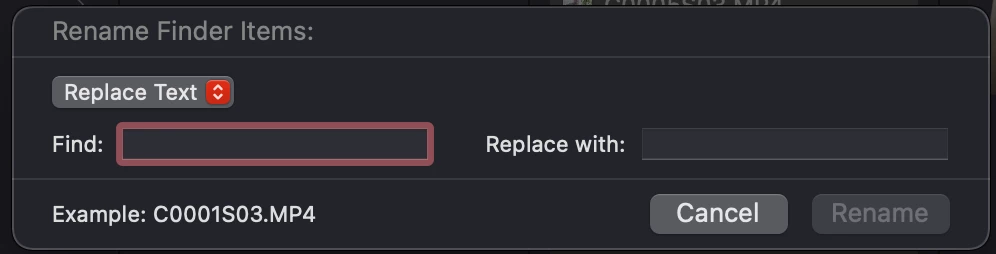
If you're on a Mac it's as easy as selecting all your proxy files in the Finder window, right clicking and selecting [Rename...] then in the "Find:" box add the extra letters or numbers you want to remove from the file name and don't add anything extra in the "Replace with:".

Give it a minute to update, then go back into Premiere and relink proxies using the "File Name" option and it should work now!

Hope this helps anyone else 🙂
21 replies

Robbie. W
Robbie. WCorrect answer
Participant
December 18, 2021

Ok so I just figured out a quick enough work around for this!

If you're on a Mac it's as easy as selecting all your proxy files in the Finder window, right clicking and selecting [Rename...] then in the "Find:" box add the extra letters or numbers you want to remove from the file name and don't add anything extra in the "Replace with:".

Give it a minute to update, then go back into Premiere and relink proxies using the "File Name" option and it should work now!

Hope this helps anyone else 🙂
Participant
December 18, 2021

Yes! This worked for me with the Sony A7S3 proxies, thank you. Makes sense now.. Canon C300 proxies only had the additional "_P" at the end of the filename (and changing this to _Proxy works), whereas Sony proxies have "S03" at the end. I was assuming it just needed "_Proxy" at the end but it's a bit more specific than that- it needs to be "_Proxy" at the end of the original file name only, so Rename/Replace S03 is the way to go with that.


Cheers!

Participant
March 23, 2022

I have a C300 and this solution doesn't work for me. I've renamed the proxy files with the exact same name as the video file(.CRM) and it still doesn't work. I have the link the proxy files one by one. I'm working on a doc, there's over a thousand files.

Community Expert
December 16, 2021

I would move everything to local drives and leave external drives for backups only,

especially when dealing with large projects and lot of assets.


Turning OFF Automatic Updates on the Creative Cloud App is an essential thing to do

Participating Frequently
December 16, 2021

It's not a large project - the problem is when creating a new project, importing new footage into it and trying to attach the the proxies with automatic linking of the proxies. Before the 2022-update, you could link to the first proxy-file, and Premiere would then automatically find and link the rest of the proxies. But it doesnt work anymore, so now you have to link each file individually in the 2022-version.

Also, I work on different computers (windows and macOS), so the internal harddrive is not an option. And besides, the workflow used to work before the 2022-update. 

Legend
December 16, 2021

First, I've never had any issues with working with external drives and I too work on both windows and macs).  But I'm wondering if there are any issues with how you're handling the cross platform functionality...  I use an app made by Paragon on my windows machine to allow it to read and write macosextended drives... and generally it works without issues although I sometimes need to relink some of the media when opening a project after it's been saved on a different platform, but the relinking is usually automatic or requires only a couple of new relocates...  What are you using to enable cross platform  access of drives?  Wondering if by any chance your external drives are  formatted APFS?  Might be an idea to try a drive formatted macosextended...   I've had issues with exfat formatted drives being read properly on a windows machine if that's what you're using...  And does this problem occur on both windows and mac?  


And wondering why you don't try (as a workaround) moving your proxies to a different folder and renaming them so their file names match the camera original...   Haven't worked with media where the recording device generates proxies automatically so I'm just throwing some ideas out.  Worth a shot...  You can use a batch renaming utility to do the renaming..  


Hope this is clear.  It's very early in NYC and the coffee hasn't kicked in yet...


Jeff Bellune
Legend
December 16, 2021

Try this:

  • Open Pr 2022 using a shortcut (Desktop, dock, taskbar, launchpad, start menu)
  • Before opening your project, go to Preferences>Media and delete *all* of your cache files.
  • Open your project and try to relink 
Participating Frequently
December 16, 2021

Hey Jeff

I think you misunderstand the problem we are having. It's not regarding relinking when opening up a project again.


The problem is when importing new footage into a new project.

Before the 2022-update, I could import my footage into a new project, select it all, right click and select "attach proxies". When the "attach proxies" window opens up, there is a option to "Relink others automatically with <Media Start>". However, with the new update, it doesnt attach the other proxies automatically anymore.


For now, my sollution was to downgrade to Premiere 15.4.1, where this workflow works...

Participant
December 16, 2021

Same problem here! It's super frustrating and needs to be fixed ASAP. I'm using camera-generated proxies from A7S3 and they're no longer linking automatically. 

I had some luck with camera proxies from a C300 MkIII which might help you out with the C70 issue. I batch renamed the camera proxies by adding "roxy" to the end of each file name (as they already have a capital 'P') and Premiere was able to auto-link them then.. Adding "_Proxy" to my A7S3 proxy files made no difference though.

Participating Frequently
December 1, 2021

I have the same problem with Sony a7s III footage and proxies generates in camera. Worked fine before the 2022-update.

sharayahc77639313
Participant
November 30, 2021

Also having this issue and it's a waste of time... Seriously after this long you'd think Premiere would work out these bugs. I hate updating only to have a feature I heavily rely on in my workflow to completely fail. 

mariae11506550
Participant
November 29, 2021

I have the same issue since I updated to the 2022 version. I tried everything and is not working.

mariae11506550
Participant
November 30, 2021

My solution was to create the project file on my laptop where I have the Premiere Pro 2021 version, imported all the footage and linked all the proxies and once done I open the project on my other computer with the PP 2022. 

Let's hope they'll fix this bug on the next update! 

Legend
November 30, 2021

no reason why you can't have both the 2021 and the 2022 version on the same computer...  Although Adobe is only keeping one previous version available, if you don't delete previous versions, they're still available on your system.  I have one system with premiere versions going back to 2017 still installed.

Known Participant
November 27, 2021

I'm facing the same problem, and now the only options are to attach hundreds of files individually, or make a proxy job but thats just a waste of time anyway because the camera has ALREADY made proxies and it doesn't make any sense to waste so much time doing it all again.

Has anyone figured out whats wrong?

Participant
November 12, 2021

Hey!


I was having the same exact issue and it's probably an update bug that needs to be fixed by Adobe.


Anyways, here's my workaround:


Downgrade your 2022 project file via this link http://joshcluderay.com/downgrade-premiere-project-converter/

Open up PP 2021

Do your Proxy duties in PP 2021

Reopen in PP 2022


Worked super quick and easy for me!

Lucas


Participant
November 22, 2021

Defaulttom is right, must be a bug from Premiere, I had the same issues, posted about it in the forum (marked as spam...lol), saw your post, did it as you proposed and everything works perfectly now.


I would just love to answer my own question in the forum, so that others find any easy fix to that issue.  Adobe gotta fix this!


Cheers

Legend
November 8, 2021

you can just relink to the proxies (after unlinking from the camera original) for editing and then relink to the camera original when you're ready to output...  it's a workaround but does work...  and shouldn't just use the "match file names" option do the trick?  Or am I having a senior moment.  I'm assuming your camera original and proxies have the same file names but different folder locations...  and assuming everything's on a local external drive not via a network drive.

JonasFedderWitt
Participant
November 9, 2021

The name is not the same. My proxy-files have a extra letter attached to the name (Canon C70 adds "_P" to the filename for proxies).

That's why i use "Media Start" instead of file name. I checked and the "Media Start" match both files.


The problem started with the 2022-update and it's occour on 4 different machines (both external and internal drives) and with different files.

Legend
November 9, 2021

I'd try moving the proxies to a different folder, and then removing the extra letter using one of the many batch renaming file utilities and see if that solves the problem when you point to the first proxy file in the relink dialog ...  worth a shot.  at least that would get you back up and running...