Proxy files made on Intel Mac do not work on M1 Mac - please help
HI, I'm using Premiere 24.2.1. I work mostly on a desktop MacStudio M1 (currently Sonoma 14.3.1). But I start the projects when I'm out shooting the jobs, and I use my MacBook Pro laptop (intel i9 - also running 14.3.1).
When I then bring them over to the MacStudio, the first thing that happens is it doesn't recognize my proxies - as if it's never heard of Apple ProRes 422 (1280 x 720). I generated those on the laptop with Media Encoder 2024 (version 24.1).
The error says my ingest settings were invalid:
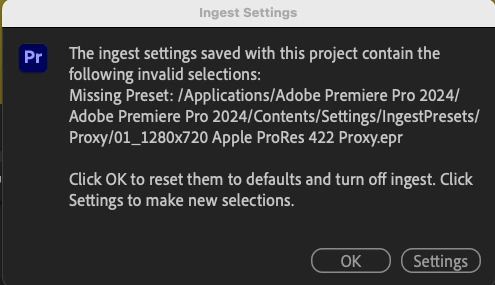
I'm using the same versions of Premiere Pro and Media Encoder on both machines. But I'm wondering if the error has to do with the different computer chips?
I also notice that the "Create proxies" ingest settings box now looks different on the M1 Mac than the Intel mac. Not as many choices.
Otherwise: How do I fix this without needing to recreate proxies?
I am working with a lot of large 4K files - mostly MXF - and just want the freedom to go back and forth on my machines as necessary, so I can work in the field or at home.
I hope I have provided enough information - please let me know if you need more.
 AdChoices