Inspiring
May 20, 2025
Answered

question about close gap

  • May 20, 2025
  • 3 replies
  • 446 views

Hello,

I have first selected my sequence window. Then I tried to use "sequence/close gap" but it does not works. Why ?

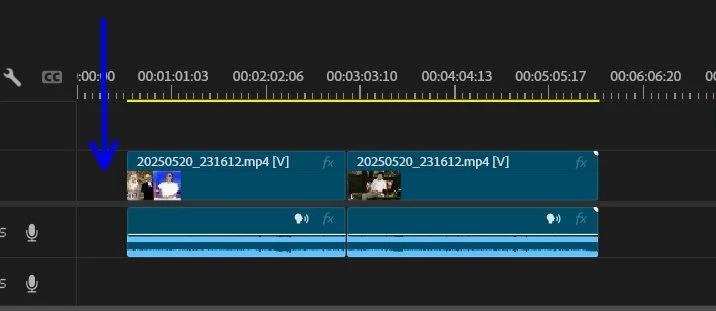
In that case it does not delete the gap before the sequence :
 

Correct answer DeanUtian

Hi @pierret18811376 
I have found Premiere Pro's - Sequence > Close Gap only works for gaps between clips. It does not work where there is a gap at the start. I'm not sure if this is the case with yours but can't see if there any clip to the left of the blue arrow in your screenshot.

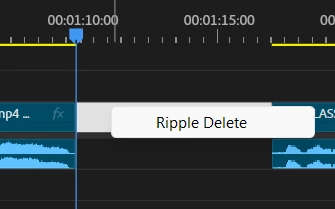
Another approach to remove the gap is to use Ripple Delete. Right click (Windows)/Control click (Mac) in the gap area and choose Ripple Delete.

3 replies

Inspiring
May 21, 2025

Hi @DeanUtian , Hi @Ann Bens 

As requested, here is the screenshot of my full timeline :


@DeanUtian You are right, the blue arrow was concerning the gap at the start of the timeline, that I cannot remove by using "sequence/close gap".

@DeanUtian @Ann Bens  You advised me to use "Ripple delete" , but I see that I can use also the "delete key" of my keyboard : what is the best to use ?

Is it a way to remove automatically all gaps by using a special function (including gap at start) ?

And is it a way to do not have gaps (like in Premiere Rush were when we delete a portion of the sequence, the gap is automatically removed) ?

I have tried to select multiple gaps in order to use "Ripple delete", but if I do "shift+click" I cannot select several gaps.

Ann Bens
Community Expert
Community Expert
May 21, 2025

Ripple delete does not work on multiple gaps.

You use whatever suits you best. Every editor works differently.

Ann Bens
Community Expert
Community Expert
May 21, 2025

Ripple Delete is usually the way to go.


Please next time give us a screenshot with the entire timeline incl header for better view of the situation.


DeanUtianCommunity ExpertCorrect answer
Community Expert
May 21, 2025

Hi @pierret18811376 
I have found Premiere Pro's - Sequence > Close Gap only works for gaps between clips. It does not work where there is a gap at the start. I'm not sure if this is the case with yours but can't see if there any clip to the left of the blue arrow in your screenshot.

Another approach to remove the gap is to use Ripple Delete. Right click (Windows)/Control click (Mac) in the gap area and choose Ripple Delete.