
Participant
November 5, 2025
Question

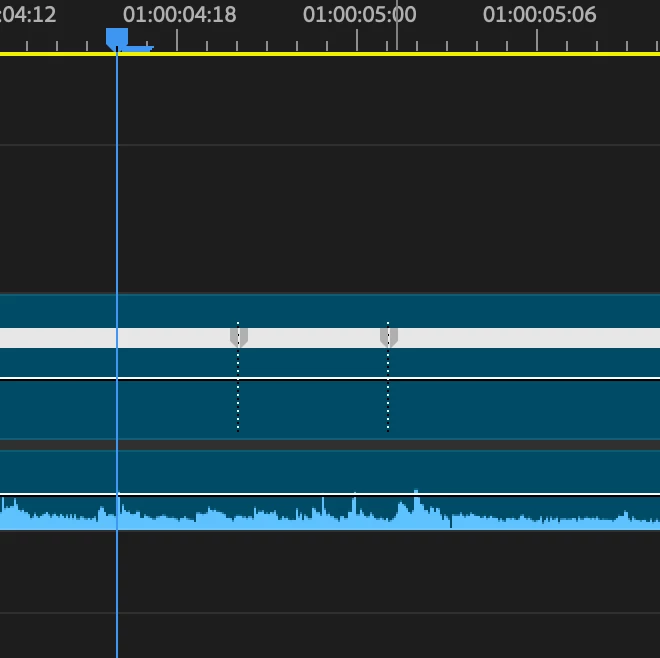
Question about dotted line that appears under keyframe in timeline when time remapping

  • November 5, 2025
  • 4 replies
  • 333 views

Hi, 

When I add keyframes to a video clip for time remapping, this helpful dotted line appears in the timeline where the keyframes are. The problem is that my students do not see these lines under the keyframes and they would like to. How do I toggle it on and off? They can see keyframes in the timeline, but not with the dotted line. We are all working in Premiere 2025, but mine is a few versions older than theirs. I'm in 25.1 and they are 25.5 See screenshot for the line I'm speaking of. Thanks for your help.
 

4 replies

jamieclarke
Community Manager
Community Manager
November 10, 2025

Hi @good_reliability5033 - The dotted keyframes only appear if you right click the clip and ensure Show Clip Keyframes > Time Remapping > Speed is selected. Once you split the keyframes, the dotted line that normally appears will no longer be visible, which is the expected behavior.

Ann Bens
Community Expert
Community Expert
November 10, 2025

As you can see by the screenshots, the clip is on Show Clip Keyframes (fat white line at the top)

Several keyframes have not been split

jamieclarke
Community Manager
Community Manager
November 10, 2025

Ann I can't remember are you on mac or windows?  Can you email me the project that you see this in I don't need the media

Stan Jones
Community Expert
Community Expert
November 7, 2025

@good_reliability5033,


I'm Win 11 testing in PR 25.5.0. The dotted line appears for speed keyframes (and only speed keyframes?) and whether they are set in the timeline or the Effect Controls panel. And as soon as there is an adjustment, the dotted line is gone. And other than undo, I can't adjust the keyframes back to get the dotted line. 


The keyframes are created with a 1 frame difference. If I fully zoom in, I see no difference between the initial keyframes (that have the dotted line) and keyframes moved back to one frame apart after they hav been moved (that do not have the dotted line).


@Ann Bens, You're the master of icons and operations: any idea how the students are not seeing this?


Stan


Ann Bens
Community Expert
Community Expert
November 7, 2025

I dont think it quite works as it should


Ann Bens
Community Expert
Community Expert
November 7, 2025

Moved to Bugs forum.

R Neil Haugen
Legend
November 6, 2025

Right-click on the clip, scroll clear to the bottom of the options, probably need to 'twirl down' to get there, and check how the "show clip keyframes" motion or time remapping option is set or not. Compare your sequence and your student's sequences.

Everyone's mileage always varies ...
Participant
November 6, 2025

Yes, show clip keyframes is set for all. 

Participant
November 6, 2025

The issue still persists. 

Community Expert
November 6, 2025

It might be dependent on how much each computer is zoomed into the timeline. Also are you all on the same platform Mac/Windows?

Participant
November 6, 2025

Thank you for your reply. Unfortunately, it doesn't change based on how zoomed in to the timeline we are. Everyone is using Macs.