Inspiring
January 6, 2017
Answered

Re-placing deleted audio components of a clip on a timeline

  • January 6, 2017
  • 2 replies
  • 681 views

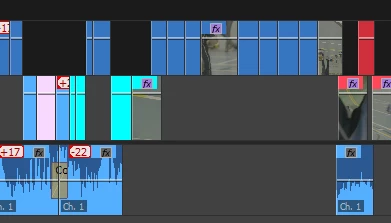
I'm working on an edit where all the clips have sync sound as part of the original file. At some point during the editing process, some of the audio has been deleted (see screen grab), but I now want to get it back where it was. Is there any way to do this, given that the clips in the bin still have their audio? Or do I just have to go through all the clips in turn, making new identical subclips from the originals and replacing the video-only versions (as below) with video and audio from the bins?

Thanks in advance!
    This topic has been closed for replies.
    Correct answer excited_Genie16B8

    There's no easy way.  Manually one at a time is it.

    In the future, moving the audio to a Muted track might be preferable to actually deleting it from the sequence.

    2 replies

    Known Participant
    January 6, 2017

    Go to the beginning of the desired clip you want to add the original audio with the up and down arrows keyboard touches.

    then press F, in the monitor source mark the entry point (I) then drag only the audio in the timeline.

    Inspiring
    January 11, 2017

    Ah, great tip - thanks!

    excited_Genie16B8Correct answer
    Legend
    January 6, 2017

    There's no easy way.  Manually one at a time is it.

    In the future, moving the audio to a Muted track might be preferable to actually deleting it from the sequence.

    Inspiring
    January 6, 2017

    That's what I thought - bit of a pain, but I guess the lesson is "never delete anything".... thanks