really weird audio playing issue in timeline premiere pro CC 2017
Hi there,
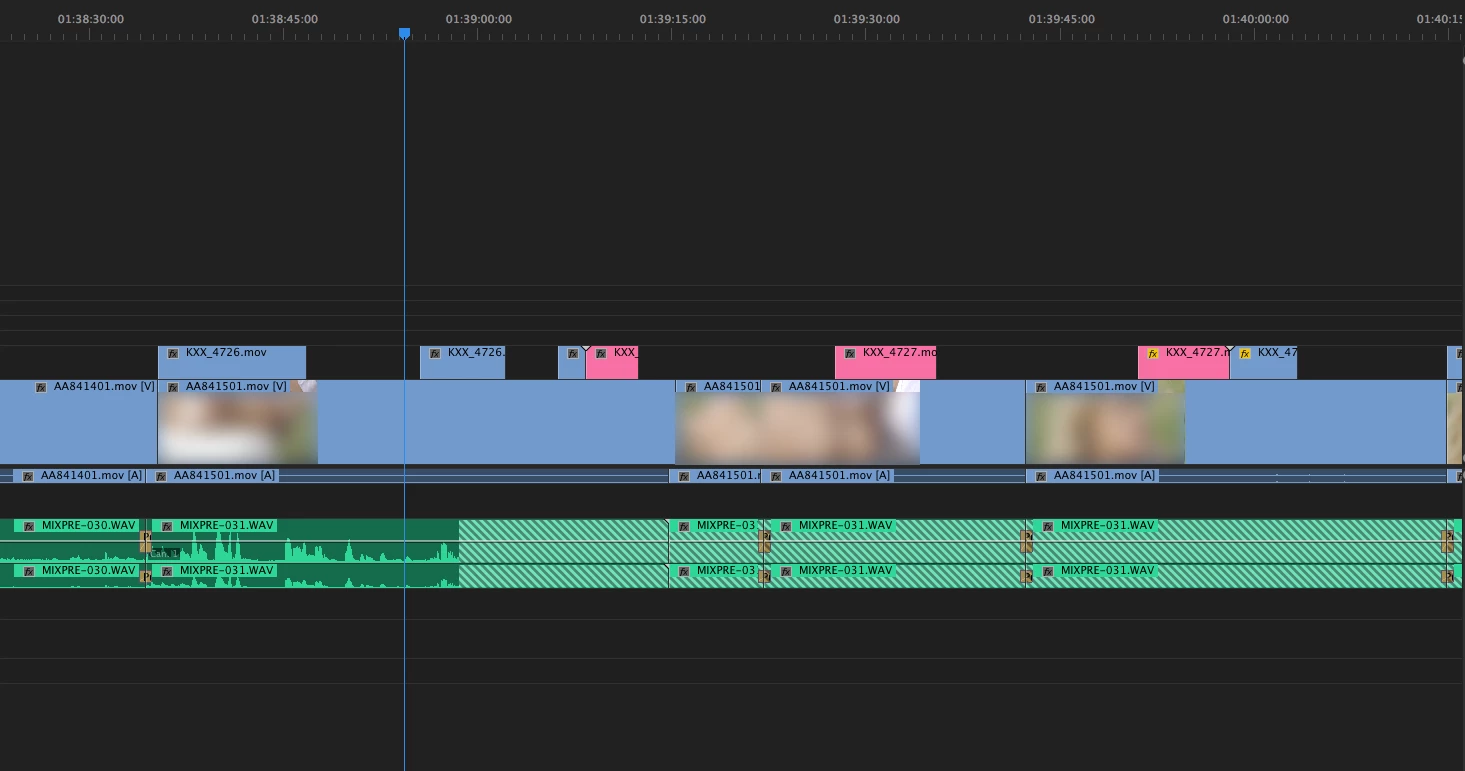
I'm having a very weird issues on some audio clips in an edit. For some reason, some audio clips are not playing in the timeline and appear stripped. Everything plays ok but those stripped audio clips. (although the first clip is only half stripped it's not playing at all, like the following ones on my timeline.
If I go get the audio files themselves and add them to the same timeline (or a new one), they play well and it works, but I don't know why it does this.
I tried to convert the audio clips in question. Then, when I replace the audioclips or link them to the new one, the same thing happens. It's almost as if there was a plug in or filter linked to those clips that were not working and would explain why they don't play (it explains why replacing the clip doesn't change the issue). Fact is the audio files have NO filter or anything of this kind on the edit timeline. And again, importing those same audio file to the timeline they would play fine.
At some point I could replace the footage by the new audio and this time it was playing but on the new audio the in/out points of the different audio clips were not correct anymore and totally out of synch.
The only solution I have so far is check the direct sound waveform , get the audio clips themselves and resynch it all manually which is really annoying.
It is not the first time I see this happening, and I don't understand why. I'd like to get this fixed or understand the cause. Can anyone help out please ?
As for the info. I use the last version of premiere pro CC 2017 on a MacPro (2013). Rushs are in ProRes, and audio in WAV (PCM)
Thanks a lot in advance
 AdChoices