Participant
October 8, 2022
Answered

Red and Green dots on footage

  • October 8, 2022
  • 3 replies
  • 1571 views

Hello, 

On the latest version of PP, I am seeing what appears to be red and green tracking dots in the source and edit viewers. They seem to be tracking edges and highlights, but I have not knowingly enabled anything that would cause this. Is there an enable/disable toggle somewhere for this. Checked system compatibility, and I am not seeing any red flags. You can clearly see, in the screenshot provided, the red/green dots on the dashboard of the car and below the sign, Shows up on every shot, (glasses, faces etc)

Many thanks for any help

All the best

Jeff
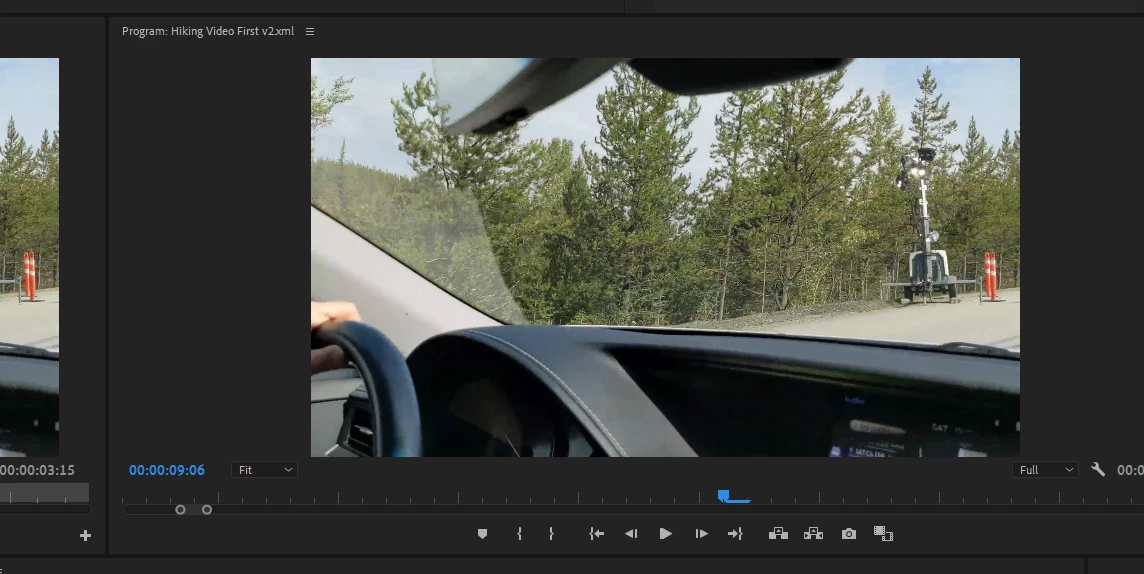


This topic has been closed for replies.
Correct answer Jeff Krebs Toronto

Hi Folks, 

I checked a few things - the only effect is a slight scale so that is not doing it, however, I think I figured it out. It's a GPU driver issue. I checked the project settings and changed the renderer to Software Only... BOOM, The dots are gone. 

Next task is to roll-back/upgrade or adjust the Intel OpenCL graphics setting. That is clearly the issue as seen in the software, only image - DOTS are gone. Strange that the looked like tracking dots tho.. 

Thanks for the help. 


3 replies

Jeff Krebs TorontoAuthorCorrect answer
Participant
October 9, 2022

Hi Folks, 

I checked a few things - the only effect is a slight scale so that is not doing it, however, I think I figured it out. It's a GPU driver issue. I checked the project settings and changed the renderer to Software Only... BOOM, The dots are gone. 

Next task is to roll-back/upgrade or adjust the Intel OpenCL graphics setting. That is clearly the issue as seen in the software, only image - DOTS are gone. Strange that the looked like tracking dots tho.. 

Thanks for the help. 


Participant
October 10, 2022

One important update - I decided to do the latest update to 22.62 Build2 and...

All the issues for GPU image compatibility issues have gone away. 

Clearly, Adobe made some changes for supporting the latest Intel Iris Xe Graphics - (would love to see the update change list)

Anyway, my images are DOT-free when turning on the GPU support.

Many Thanks

Jeff

 
R Neil Haugen
Legend
October 8, 2022

You have an effect working on that clip of the first screen shot ... what is it?


Neil

Everyone's mileage always varies ...
Peru Bob
Community Expert
Community Expert
October 8, 2022

Does t appear on all clips?


Delete the Media Cache and Media Cache files:
https://community.adobe.com/t5/premiere-pro/faq-how-to-clear-your-media-cache-in-30-seconds-in-premiere-pro-2020/m-p/11017257/thread-id/260446?page=1

If that doesn’t work, try updating or rolling back your graphics driver directly from the video card manufacturer’s site. If NVIDIA, do a clean installation of the latest Studio Driver (NOT the Game Driver)

If that doesn't work, try creating a new project and import the old one into it.