
Ahston
Participating Frequently
November 30, 2020
Question

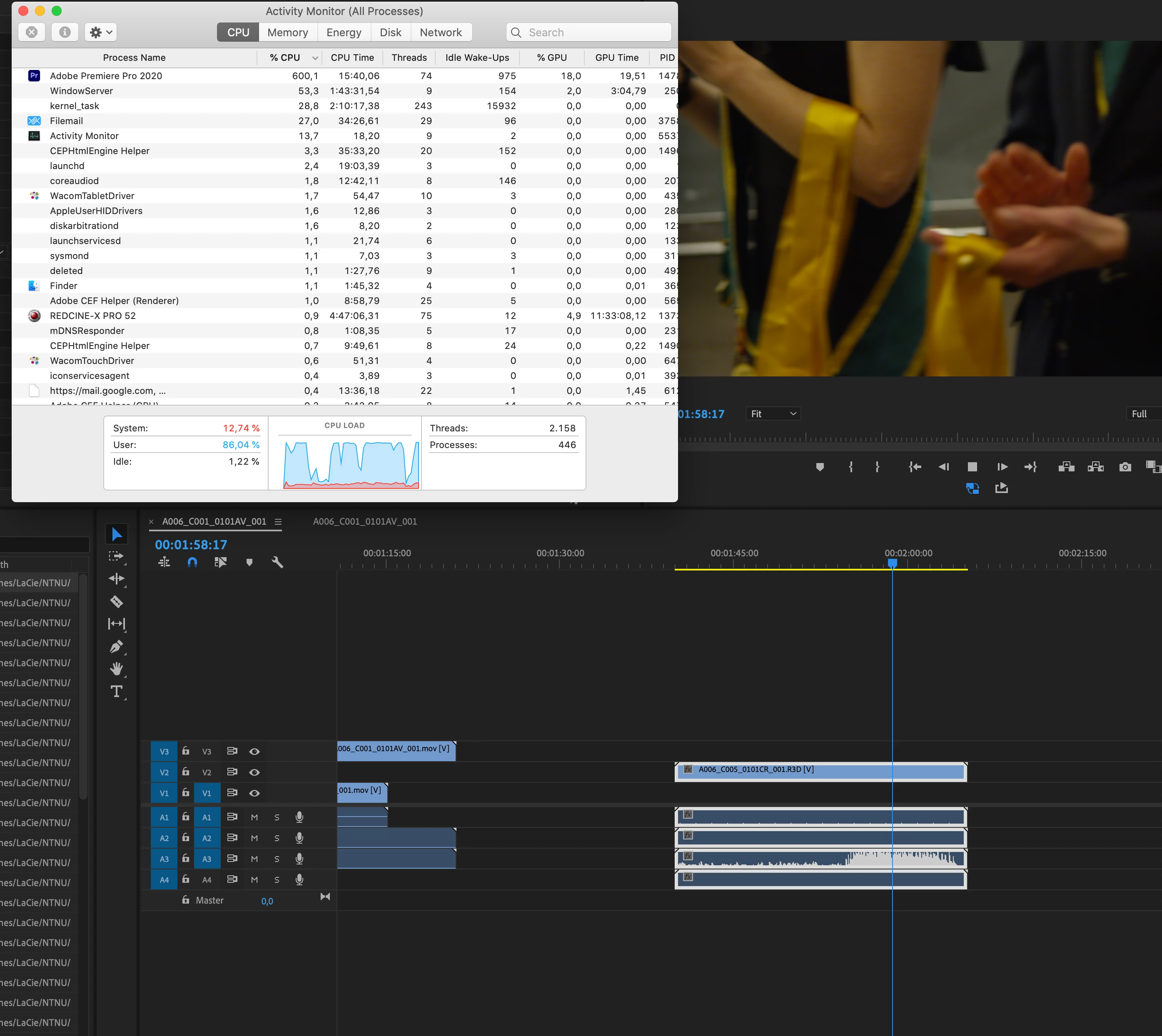
RED footage lagging and using all of CPU, even when using proxies.

  • November 30, 2020
  • 3 replies
  • 2005 views

This was a huge problem on my last projekt, so this time I've decided to just transcode all material to prores 4k up front and hopefully, I'll never have to go back to the original RED footage. I've tested this several times and prores 4k runs much smoother than the RED material. Using quicktime proxies doesn't really make much of a difference, which is strange. Apparently, lots of people don't have these issues with RED footage and I must admit that it bugs me a bit that I do. Converting all material to prores is abit of a hazzle really. I'd love to not have to do that. If anyone out there has any idea what might be causing this, please let me know.

I'm on a iMac (2017) 4,2 ghz i7, 40gb ram, Catalina. All software is updated. See screenshot of cpu usage while doing playback of RED footage. When switching to Prores 4k the computer can cope just fine goes, typicall at 200% cpu when playing back in full quality. 
This topic has been closed for replies.

3 replies

Inspiring
December 1, 2020

If you want to playback 4K R3D files you should get an 8 Core CPU as seen in the video. That being said can you drop down to 1/2 resolution? Do you have a dedicated GPU?

Community Expert
November 30, 2020

It has been a while since I edited with RED footage, and back then I think I was still using proxies. RedCineX will allow you to make proxies and keep the names and extensions the same. Since the red clips are spanned media I don't actually know if it's better to make proxies through redcine-x rather than Premiere. I don't think I've used any RED footage since the new Premiere proxy workflow came out (but the old workflow would still work).


ProRes is a good editing codec, but depending on the type of ProRes you are using (422 LT, 422, 422 HQ, etc.) it can be very high bitrate. What is your hard drive situation? Can it support the throughput?


When you made proxies, what kind did you make? You said Quicktime, but what? Were they lower res ProRes Proxy?

Ahston
AhstonAuthor
Participating Frequently
November 30, 2020

Hi Phillip


Thanks for your reply.  I've made 422, 4k prores in REDcinexPro. Not so much proxies as just swithing to prores for the remaining of the project. The quality will be good enough. This was my planned workaround, and it is working out just fine. But it is a lot of extra work and harddrive intensive. So the question is if anyone knows why my system can't seem to handle the RED files at all and if there is some way to fix that in future projects. 

Community Expert
November 30, 2020

If I get a chance I'll see if I can locate some old r3d files and try the Premiere proxy workflow.


I think your ideal workflow would be to use proxies and keep the original r3d files for the "online." 

R Neil Haugen
Legend
November 30, 2020

I wonder if @Kevin-Monahan might have a suggestion?


Neil

Everyone's mileage always varies ...