


Participating Frequently
March 3, 2025
Question

RED spanned clips not automatically combining in Media Browser

  • March 3, 2025
  • 9 replies
  • 517 views

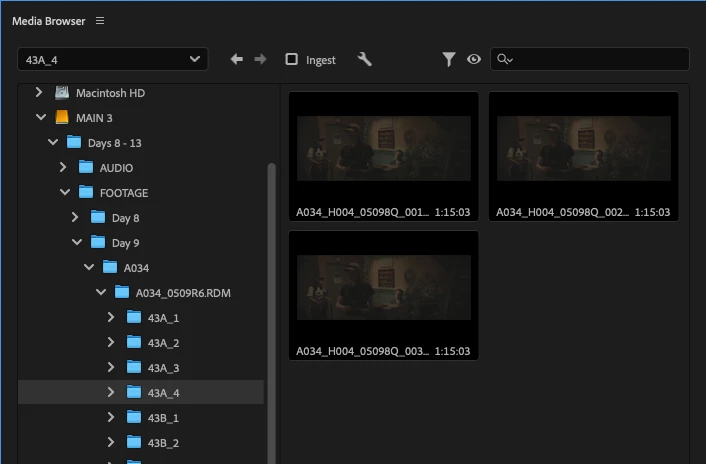
I'm trying to import RED footage through Media Browser and the spanned clips are not automatically combining. I've tried different computers, uninstalling and reinstalling Premiere Pro 2025 all the way to 2022, just "import media" as well as dragging and dropping media. Nothing seems to work. Here's a screenshot of my Media Browser. I feel like there's gotta be a simple solution where I just need to click a setting option, something like "automatically combine spanned clips." 


9 replies

Warren Heaton
Community Expert
Community Expert
March 3, 2025

Which RED camera were these recorded in?

us at tlcAuthor
Participating Frequently
March 3, 2025

komodo

us at tlcAuthor
Participating Frequently
March 3, 2025

I feel like it's not a matter of how I import, but a setting in Premiere. Like an option I need to select "automatically combine spanned clips." But if this option exists, I don't know where it is. 

R Neil Haugen
Legend
March 3, 2025

I've both imported Red clips "poorly" ... the issue you're having. And a couple times after, got them in correctly.


But I haven't done any Red imports in at least six months, and my memory is totally bonked about what I did. 

Everyone's mileage always varies ...
us at tlcAuthor
Participating Frequently
March 3, 2025

If you have a moment to give it a test, I'd super appreciate it. I've watched a million youtube videos and read the Adobe Community threads. I've even had Adobe customer support remotely take control of my computer to try and import and figure this out. I'm completely at a loss. 

R Neil Haugen
Legend
March 3, 2025

Are you selecting the folders with the clips to import, or the clips themselves?

Everyone's mileage always varies ...
us at tlcAuthor
Participating Frequently
March 3, 2025

Both. I've tried selecting the clips themselves as well as all the folder hierarchies. Selecting "FOOTAGE" all the way down to the folder that holds the clips. And everytime all the individual spanned clips get imported in. 

R Neil Haugen
Legend
March 3, 2025

Have you tried the Import "page", selecting the overall-folder at the top of the RED folder tree?


Karl Soule has demoed that workflow. It's on his YouTube stuff.

Everyone's mileage always varies ...