



sajaever
Participant
June 17, 2026
Question

remiere 26.2.2: Interpret Footage / Pixel Aspect Ratio Question

  • June 17, 2026
  • 1 reply
  • 18 views

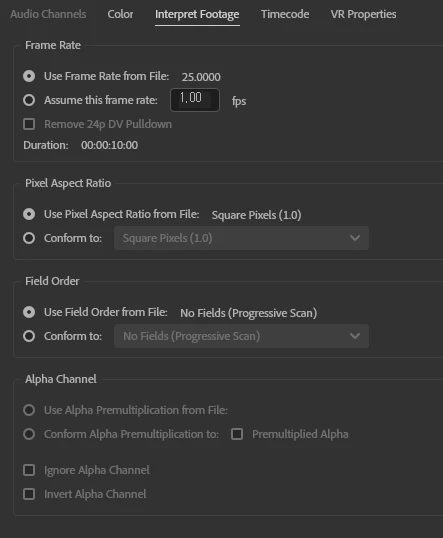
"In Premiere 25.6.5, when a 1920x804 video is imported into a project, the file's pixel aspect ratio is automatically set to Square Pixels. However, in Premiere version 26.2.2, the pixel aspect ratio is set to OTHER Aspect Ratio (2.390). Why does this happen?"

25.6.5


26.2.2
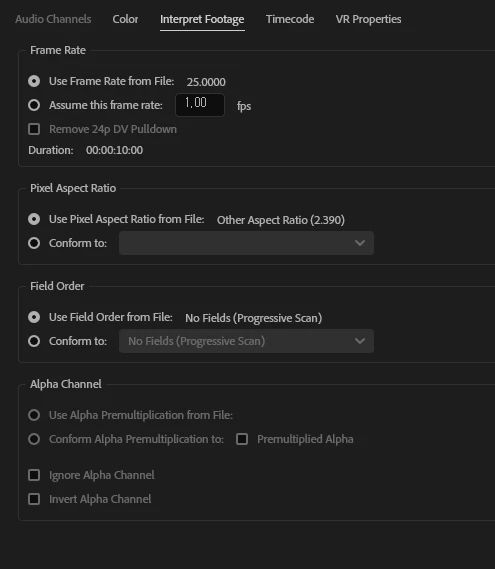

same video

    1 reply

    Community Expert
    June 17, 2026

    Does the clip look the same in both versions of the app? 1920x804 is a 2.39:1 aspect ratio, so its pixels would not need to be stretched any further.
     

    Premiere Pro reads the pixel aspect ratio from the metadata embedded in the media file. It sounds like Premiere Pro 25 was not reading the metadata correctly for the file format you are using. This is common with raw and other new proprietary formats, where Premiere Pro needs to be updated to read the metadata.


    Can you share the camera and file format used to capture the footage?


    You can confirm the footage's pixel aspect ratio by opening it in MediaInfo and checking the Display Aspect Ratio: https://mediaarea.net/en/MediaInfo/Download