

Question
Remix audio tool does not stop where I tell it to stop
Hello,
As you can see in the left image, I performed a remix of the audio and I "extended" the audio to where the blue line is stoped,
The problem as you see in the right image, the result of the remix continue all up until it meets another audio, whereas I want it to be VERY PRECISE and stop exalcy where I am telling it to stop...
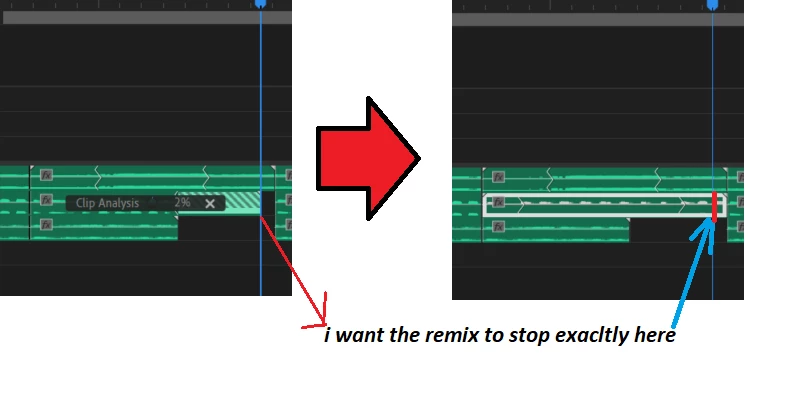
Is this a bug, how can I solve this without having to manually "recrop" the audio and make it stop where I initially extended the audio (using the remix tool)?
(edirt:Do I have to report this in the "Adobe Audition" section of the forum? Can the Adobe Premiere Pro Team fix this issue or do I have to write in the section of the audition team?)
T,hanks


 AdChoices