
Participating Frequently
December 16, 2021
Question

Remove / change default presets bin folder

  • December 16, 2021
  • 1 reply
  • 2411 views

Hey all!


So I just installed a preset that another Editor on my team shared with me and it created this folder:
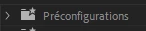
And it now sits at the top above my other folders, including my previous "Presets" bin which was the default and used to sit at the top:
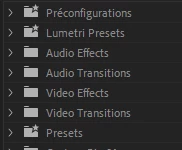
Anyway, I've since removed the presets from within that folder, but now I cannot delete the folder itself or rename it. Has anyone faced this issue before and know how to fix? Adobe haven't been much help other than suggesting I reset my preferences, which they inform me will remove all custom presets, which ain't happening.

This topic has been closed for replies.

1 reply

Jeff Bugbee
Community Expert
Community Expert
December 16, 2021

can you navigate to that folder on your fileystem and remove it there instead of within Premiere?

Participating Frequently
December 16, 2021

Unless I'm being blind, I wish it were that easy. It appears Adobe wraps all presets into one file and that's it. I've searched high and low through the Adobe folders in:

-My Documents

-Program Files

-App Data

But nothing 😞


This is what the file I mentioned looks like:


Ann Bens
Community Expert
Community Expert
December 16, 2021

Export all custom presets from the effects palet

Close Premiere

Delete the Effect Preset and Custom items.prfpset


reboot program

import all exported presets.


Resetting preferences does not delete custom presets.