
Participant
August 15, 2023
Question

Remove pop up when clicking "go back" button in Project panel

  • August 15, 2023
  • 2 replies
  • 261 views

How can I remove the pop up that shows when I click the "go back" button in the project panel?
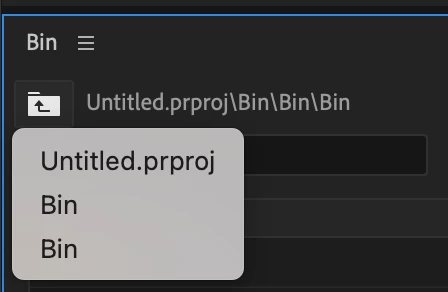
I used to not see this, but I think one day I accidentally turned it on. When I'm backing out of bins this menu shows up and it slows me down. Thanks for you help!

This topic has been closed for replies.

2 replies

Participant
August 15, 2023

I'm using Premiere 2023 version 23.1.0 (Build 86)

MyerPj
Community Expert
Community Expert
August 16, 2023

I'm on 23.6 and it works for me. Win11 22H2

MyerPj
Community Expert
Community Expert
August 15, 2023

There's a 'Show Tooltips' on the first preference page, check it out.

Participant
August 15, 2023

Didn't work 😞 I turned off "Show Tool Tips" but the menu is still showing up.