n0n0
Known Participant
July 2, 2023
Answered

Remove tools

  • July 2, 2023
  • 2 replies
  • 666 views

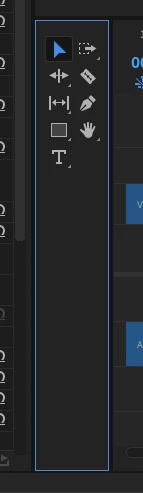
How can I remove this panel from a workspace view, if possible?
This topic has been closed for replies.
Correct answer daapap

You can close the panel by simply activating it, then hit CTRL+W (if you are working with Windows, at least).

2 replies

daapapCorrect answer
Inspiring
July 3, 2023

You can close the panel by simply activating it, then hit CTRL+W (if you are working with Windows, at least).

n0n0
n0n0Author
Known Participant
July 3, 2023

Thank you!  Both of those solutions work for Mac.

R Neil Haugen
Legend
July 2, 2023

Hover the cursor over the upper left corner, and you can "grab" and move it. With it selected (blue line around it) you can at times close it. But it's a bit of a pain deal with. I just keep it narrow.

Everyone's mileage always varies ...
