
Participant
June 12, 2021
Answered

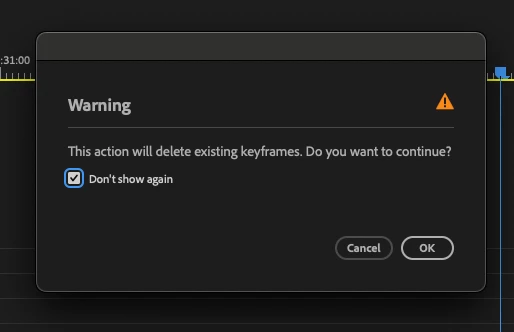
removing warning message about deleting existing keyframes

  • June 12, 2021
  • 11 replies
  • 1749 views

i dont think i ever once needed adobe to tell me that if i delete all the keyframes it will delete all the key frames... its really annoying everytime i want to clear the keyframes it warns me i am about to do exactly as i had planned to do. is there a way to disable this?
 

Correct answer FunFürFelix

I am so happy, guys! 🥰

11 replies

FunFürFelix
FunFürFelixCorrect answer
Inspiring
November 18, 2025

I am so happy, guys! 🥰

Known Participant
November 19, 2025

Yes!!! Finally. This has been bothering me way too much. I use "delete all the keyframes" button all the time and this is actually a proper quality of life improvement for me.

MyerPj
Community Expert
Community Expert
May 19, 2025

It would be best to simply upvote this post, the more upvotes the more likely the staff will take an interest. It's the big number upper left, next to the thread title.


Known Participant
May 19, 2025

Can we just all report this as a bug to: https://community.adobe.com/t5/premiere-pro/ct-p/ct-premiere-pro?page=2&sort=latest_replies&filter=all&lang=all&tabid=bugs 

I don't see this as anything else than a bug that has been overlooked as a feature for way too long.

Participating Frequently
April 30, 2025

Adobe: this is extremely annoying and pointless considering, as others have pointed out already, that AE does not have or need this feature and Undo exists. Disabling keyframes does not need to have a notification dialogue that must be dismissed every single time (which is often). 

Please, this has got to be one of the easiest points of frustration to address on your end, so please do us all a huge favor and remove this stupid box. It will make everyone's process so much better instantly.

FunFürFelix
Inspiring
February 18, 2025

For my folks out there using Autohotkey. Here is my solution to this problem (Premier Pro 25.1 in Englisch):

#SingleInstance, force
#Persistent

SetTimer, CheckPremierePro, 10000

CheckPremierePro:
If WinExist("ahk_exe Adobe Premiere Pro.exe")
{
SetTimer, CloseWarning, 10
}
else
{
SetTimer, CloseWarning, Off
}
return

CloseWarning:
If WinExist("ahk_class #32770")
{
Send, {Space}
Sleep, 100
}
return


Actualy, if noticed that this script does not wort because of changes to premiere pro from v24.0 to v25.1... cool. Thank you!

Trooper Johnson
Participating Frequently
February 16, 2025

I know this is old, but was there ever an update that introduced a setting for this? The warning is incredibly useless when I can just ctrl+z and get it all back if I accidentally click it (which hardly ever happens in the first place).

FunFürFelix
Inspiring
October 6, 2023

There should definitely be a checkbox to permanently disable this warning!

MyerPj
Community Expert
Community Expert
October 6, 2023

I'm used to it, it just takes a click and a thumb. Click the clock, thumb the spacebar.

FunFürFelix
Inspiring
October 6, 2023

Yes, like I said. I totally got used to closing it without even noticing. Although I should probably get used to hitting the space bar instead of clicking on it, or write a script that can automatically close that annoying little window. Also... This "one click" mentality can quickly add up to destroying the whole user experience of using Premiere.

FunFürFelix
Inspiring
October 6, 2023

After Effects does not have this. Why does Premiere? I've gotten so used to always clicking away the warning that I didn't even realize how annoying and absolutely unnecessary this dialog box is!

donnab6870197
Participant
April 17, 2023

100% agreed. It deafeats the porpose of having a delete all keyframe option. You don't get that warning in ae.