
OptOutside
Participating Frequently
January 24, 2023
Answered

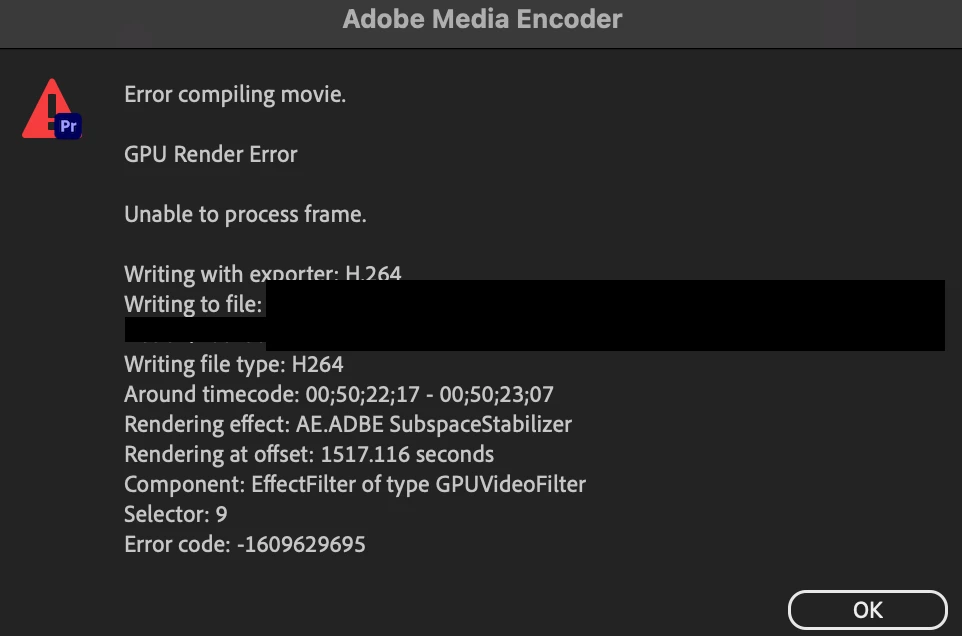
Render Fails at any Warp Stabilized Footage

  • January 24, 2023
  • 3 replies
  • 4319 views

It doesn't matter if if my sequence or render is 4k, 1080p, or any codec, Premiere fails to render once it reaches any warp stabilized footage. The only time it doesn't fail is if the footage and render is vertical footage 1080p for social media content. I've upgraded my OS to Ventura thinking this would help the issue, but it didn't. I ended up rolling back to the latest Premiere 22 version and it hasn't helped. Any help is appreciated as this is a lengthy project and having to go and do stabilization in After Effects would be ridiculously time consuming.


I responded to another issue with the same error code, however, this seems to be a separate failure mode so am creating it's own discussion thread as I can't find anything on it.


MacBook Pro, 2021

Chip: Apple M1 Max

Memory: 64gb

macOS - Ventura 13.1

Premiere version 22.6.3 (build 2)
 

This topic has been closed for replies.
Correct answer R Neil Haugen

I did NOT say disable Warp! I suggested doing a render & replace after intial anlysis, which applies the Warp effect to a new clip. Therefore the effect is processed by itself, a much simpler operation.


You need to set your R&R format/codec to something that is good Q of course, as that is now the clip on the sequence. If you are exporting say ProRes 422, and set the R&R to that, and use "smart exporting" by turning on use previews ... then that section is already ready for the export.


Neil

3 replies

Participant
December 16, 2023

Rendering in "Software Only" mode worked for me. Slower, but got the job done.

Participant
July 2, 2024

Worked for me - Thanks 🙂

Inspiring
December 9, 2023

Came here with same issue, won't render if warp is active. Used to work fine but i haven't used it in months.  I updated to latest version. Render and replace is not the solution, i want to keep orginal on timeline. it SHOULD work.


I cleared all cache, reinstalled GPU drivers, PP did its initialzing gpu. Still won't render. It's a 9:16 sequence 25fps

Render and replace fails too, both with prores and dnxd (complains about aspect ratio)


Inspiring
December 9, 2023

It was affecting two clips only for some reason, turned off  warp on those and exported, other clips with warp rendered fine. 

Participant
December 12, 2023

I'm having the same issue since yesterday. Have you solved that?

R Neil Haugen
Legend
January 24, 2023

Have you tried a straight render and replace for any Warped clips? Rather than exporting with Warp still being processed on the export?


Neil

Everyone's mileage always varies ...
OptOutside
Participating Frequently
January 24, 2023

Yes if i disable/delete the warp stabilizer on the affected clips it will render fine. Also if I delete only the first few, it will fail later on an the next clip with the effect.

R Neil Haugen
R Neil HaugenCorrect answer
Legend
January 24, 2023

I did NOT say disable Warp! I suggested doing a render & replace after intial anlysis, which applies the Warp effect to a new clip. Therefore the effect is processed by itself, a much simpler operation.


You need to set your R&R format/codec to something that is good Q of course, as that is now the clip on the sequence. If you are exporting say ProRes 422, and set the R&R to that, and use "smart exporting" by turning on use previews ... then that section is already ready for the export.


Neil

Everyone's mileage always varies ...