
Render problem?
Good morning from the Netherlands!
I recently started working with Adobe Premiere again.
I am editing my last vacation with photos from my DSLR and videos of my GoPro.
Now is a part of the assembled/edited video not visible when I do a playback in preview mode. Even when exporting, i still cant see that part.... See screenshot.
Total time of the project/video is approximately 29 minutes. From minute 1:59 to 13:40 I only see a black playback screen in preview but I hear the music I added. I also saw that in the part that is not displayed that there is not a green line in the bar above the timeline, in the parts of
the video that are correct displayed there is a green line.
When exporting the video i have the same problem.... I've tried to re-render that part of the video that isn't displayed properly, but that doesn't work either.
Affects 2021 Adobe Premiere Pro on a 2020 iMac.
Anyone any idea?
Ruud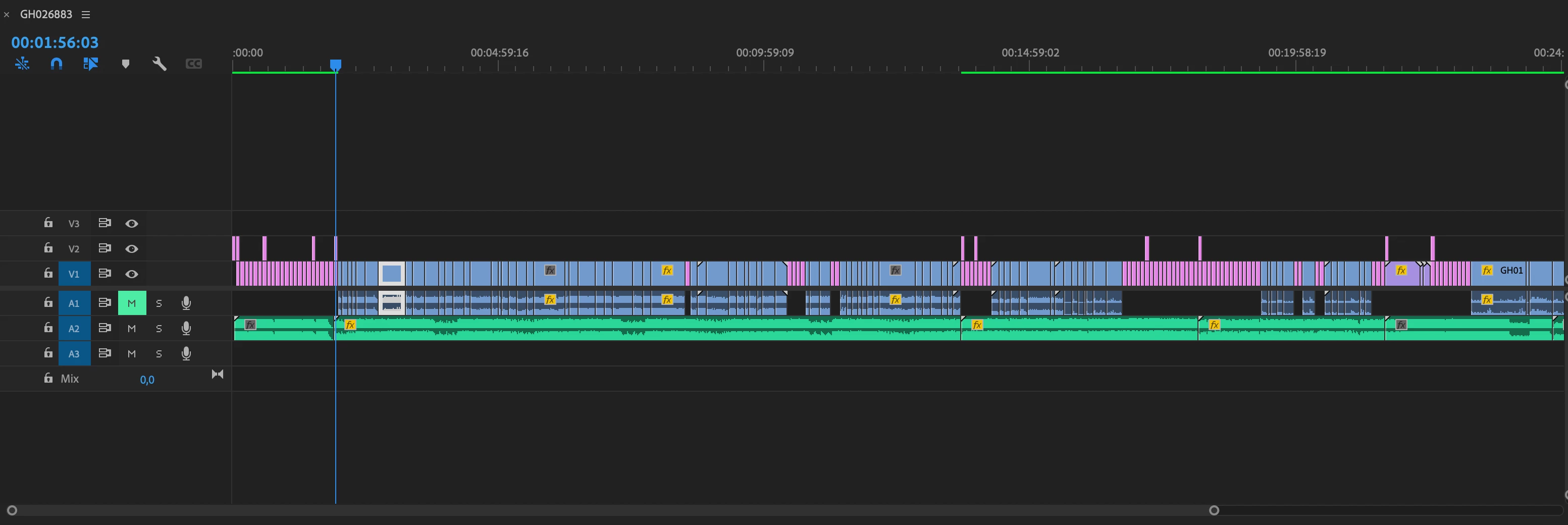
 AdChoices