joshs130237
Inspiring
May 22, 2018
Question

Rendered out version shorter than original.

  • May 22, 2018
  • 3 replies
  • 541 views

Hello !

I'm facing a delicate issue, when I'm using Adobe Premier, i have about 50 clips to batch render and some of them are in 29.97 fps, 25 fps or 23.98 fps.

When I render them out some of them are exactly 10 seconds as i wanted them to be but others are 9 seconds.

How can I set the sequence properties to match all of them so when i render them out all of them stay at exactly 10:00 seconds long.

Small info:

I select all the clips (all of them are cut exactly at 10:00seconds), make a subsequence and then use the project manager to render them out as individual clips.
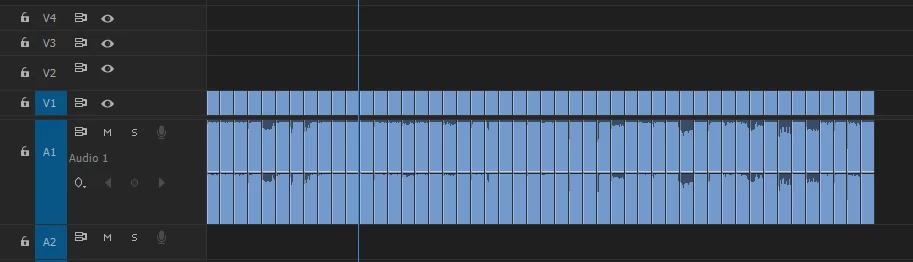
Thank you in advance !

This topic has been closed for replies.

3 replies

Community Expert
May 22, 2018

Please try following the steps that I listed. Also, there are brackets in the source monitor pointing left and right. This is how you set your in and out points. If you hover over the brackets with your mouse he name of the tool will pop up.

After you make/name your sub clip it will appear in the project panel.

Highlight them in the project panel, right click on them and add them to the Media Encoder que.

joshs130237
Inspiring
May 22, 2018

Ok. I managed to follow the steps, but the same issue arises, some videos are shorter than other. Sadly my project needs perfection.

Any ideas on how I could do that ?

Community Expert
May 22, 2018

Perhaps try turning them in to subclips. Double cicick on a clip to get it in to the source monitor. Set in and out points then go to the top of the interface. Clip/Make Subclip. Highlight your sub clips in the project panel and do a right click que. You will need Media Encoder installed for this process.

Waldorf & Statler
Inspiring
May 22, 2018

We have the same problems, with h.264 / mpeg4 codec Files.

After gererate proxy Files with DaVinci Resolve in ProRes or DNxHD

it run. I think it's a litel ADOBE Premiere Bug wit gop codec files.

joshs130237
Inspiring
May 22, 2018

Could you explain how to do that exactly ?

The issue is that i still need to keep it simple and not render it out separately.