


stevemvp
Participant
June 8, 2018
Question

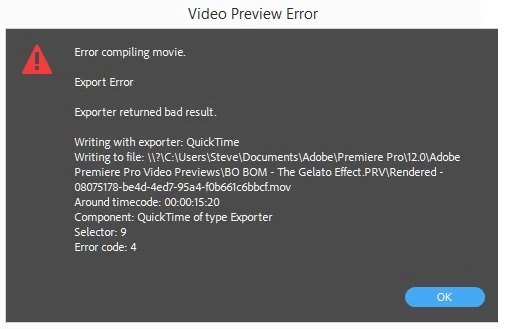
Rendering Error Code 4

  • June 8, 2018
  • 11 replies
  • 63013 views

Hello Forum,  Today I have been getting this Error Code when trying to render, even short clips.

I have been unable to find any specific online help

As an experiment, I opened a different Premiere Pro project and was able to render without any issues.  However, when I reverted back to the problem project, the error recurred. When I try to render different parts of the project, I get the same Error Code 4 but the timecode numbers are different.  I have been rendering within this project for a few days without issue.  So why now?
11 replies

elliceel16
Participating Frequently
August 26, 2022

I keep getting the same error message. Even on videos with no effects.

ALIASLABS
Participating Frequently
August 26, 2022
Memory is full on your scratch disk drive
elliceel16
Participating Frequently
August 26, 2022

How do I find where my scratch disk drive? And how do I clean it so my rendering is working.


Participant
May 13, 2021

I had this issue today and tried a few of the mentioned solutions, but what appears to have worked for me is slightly adjusting the position of things on my timeline, and instead of marking the entire portion that I needed rendered, I just did it in chunks. So I made my in and out markers much closer together and went pieces at a time. No more errors right now. I have no idea why that would work. 

Participant
February 16, 2021

I am having this Issue from the last 2 days and i am so frustrated as i am unable to do my work on it please help me on getting this resolved 


davids58395606
Inspiring
February 16, 2021

The new version has been crap for exporting, just check the reddit to see other people having the same issue.


I just export about 5 times, constantly until it randomly decides to work one of the times (not sure why it does) Software only isn't an option since I have deadlines and can't wait 6 hours for a render, so just try a few times in a row until it decides to work 🙂

Participating Frequently
March 2, 2021

Hi,


Did you solve or find a way to fix this problem temporary?

I can't render a XML exporter timeline out of Davinci Resolve in Premiere Pro and gives me the error code 4 aswell..


Participant
October 13, 2020

if you are using a hard disk, most probably, it is because you accidentally disconnected the hard disk, I had the same problem

Alex Nichols
Participant
September 19, 2020

I ran into this problem just yesterday and went through the annoying trials of dealing with it this morning, like everyone else who uses Adobe Premiere Pro, I came on here to seek answers and used every trick suggested.
Alas, many of them did not work. Except for one.
I removed the effects I had added to the video clips to enhance the visual appearance, to my surprise, and relief, that worked. The error message went away, I was able to render and save the project and I am in complete blissful joy right now.

And it's for that reason I wanted to come on here and thank you and everyone within the Adobe Community for your advice and help for one another when we all suffer from troubles like these ones. 
Stay healthy and safe and, to all content creators out there who use Adboe, keep on creating!

Legend
September 19, 2020

thanks for your thanks and thanks for posting your solution.  but...  wondering why it worked.    If you want to help others, it would be a good idea if we could figure out what was causing the problem.  Please tell us your system specs: OS version, Premiere version, amount of RAM, Hardware specs including graphics card and tell us your source properties and your sequence settings?  Were any of the effects you'd applied 3d party effects?  If not, what effects were they?  

Participant
June 5, 2020

I'm also getting this error, and it was working fine before, I have a brand new computer. Very concerning. 

Legend
February 26, 2020

benediktf96484630  if your problem was that you had insufficient hard disk space, removing a few files may solve the immediate issue but you're still sitting on a timebomb.  You should always keep at least 10% free space on any hard drive and atleast 20% on your startup drive.  If your hard drive has very little space available, things can get corrupted and you could potentially lose everything on the drive.  Many programs will automatically write files to your startup drive so you need to regularly monitor the space available cause this can bite you on the butt at the worst possible moment.   I know TechToolPro has a utility that will warn you if drive space is becoming a problem.  I'm sure there are other apps out there that will do the same thing.

Participant
September 19, 2019

Your hard drive is probably full. Mine was until I realised. Was getting this error messgae.

Try another drive ffor you rnders or exports.

Participant
February 26, 2020

Hi jamestag,

Thanks for your suggestion, I found the solution. 

After deleted some files from my hard drive and, finally exported without any problem.

Regards,

André 

Kevin-Monahan
Community Manager
Community Manager
June 27, 2018

SteveMVP,

Still having trouble here? Let us know.

Thanks,
Kevin

Kevin Monahan - Sr. Community & Engagement Strategist – Pro Video and Audio
Participant
July 4, 2019

Hi, I have the same issue and deleting render files doesn't work. What other methods can I try?

Community Expert
July 4, 2019

clean media cache

Community Expert
June 8, 2018

You have to delete your video previews, choose Sequence - Delete Render Files

or delete the video previews manually, you can find them at the same location as scratch disks

Participant
June 2, 2024

Thank you for this! It worked!