Participant
November 20, 2022
Answered

Rendering Issue

  • November 20, 2022
  • 1 reply
  • 815 views

So... whenever I finish editing a video I render it and then export it. Though sometimes when rendering a video, it will pull up a message saying 'Finished product was bad result' and I couldn't get around it; so I just exported the video as is. It didn't affect quality in the slightest but I was wondering why some videos I could render. I don't have an example or any screenshots since I just exported the videos regularly, but hopefully someone can help. If not it's okay, nothing big. 
This topic has been closed for replies.
Correct answer Kevin-Monahan

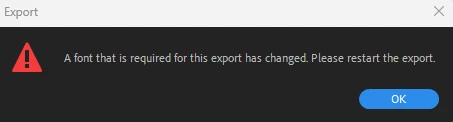
I freed up storage and changed the directory file for where the exported video goes to but nothing seems to change the outcome. I've tried the H.264 which exports .mp4, the Apple ProRes MXF OP1a for .MXF files, and the AVI formats, but nothing seems to work and I keep getting various error messages:

The only difference that the AVI format made was that it exported deficient quality the whole video except the last 14 seconds and it shows that error message I put in the last reply.


Hi @HorizonTunes27223309vk55,

I would try freeing up more storage. H.264 needs a lot of overhead to complete the file processing that needs to happen. Hope the advice helps.


Thanks,
Kevin

1 reply

Ann Bens
Community Expert
Community Expert
November 20, 2022

The only time you need to render is when using the preview files.

Kevin-Monahan
Community Manager
Community Manager
November 21, 2022

Hi Horizon Tunes,

Thanks for the question. Try exporting via Media Encoder next time. Does that work any better? If not, check out the logs and post them here.


Thanks,
Kevin

Kevin Monahan - Sr. Community and Engagement Strategist – Adobe Pro Video and Audio
Participant
November 6, 2023

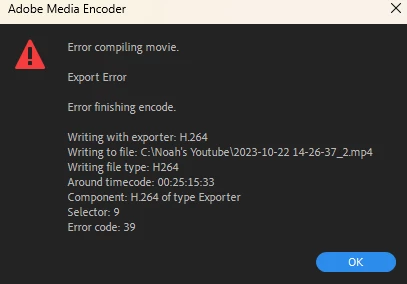
I fixed the previous problem, but I am now experiencing a new one. Every time I export now, sometimes it will either export the video, but when I open it up, there is a certain time in the video where it completely stops and shows this message: 


or it will either just not export at all and show an error message. 

I tried to use the Media Encoder but the results said "Failed"

This is what is said, 

" Encoding Time: 00:17:35
11/05/2023 10:32:05 PM : Encoding Failed
------------------------------------------------------------
Export Error
Error compiling movie.

Export Error

Error finishing encode.

Writing with exporter: H.264
Writing to file: C:\Users\[My Name]\Videos\[File Name].mp4
Writing file type: H264
Around timecode: 00:25:15:33
Component: H.264 of type Exporter
Selector: 9
Error code: 39

------------------------------------------------------------"

The timecode that it gives is literally the last millisecond of the video exported.

I don't know what else to do at this point, so please help me.