
shannond26145410
Participant
April 11, 2022
Question

Rendering video off center?
  • April 11, 2022
  • 3 replies
  • 5319 views

Would love some help. This is killing me..

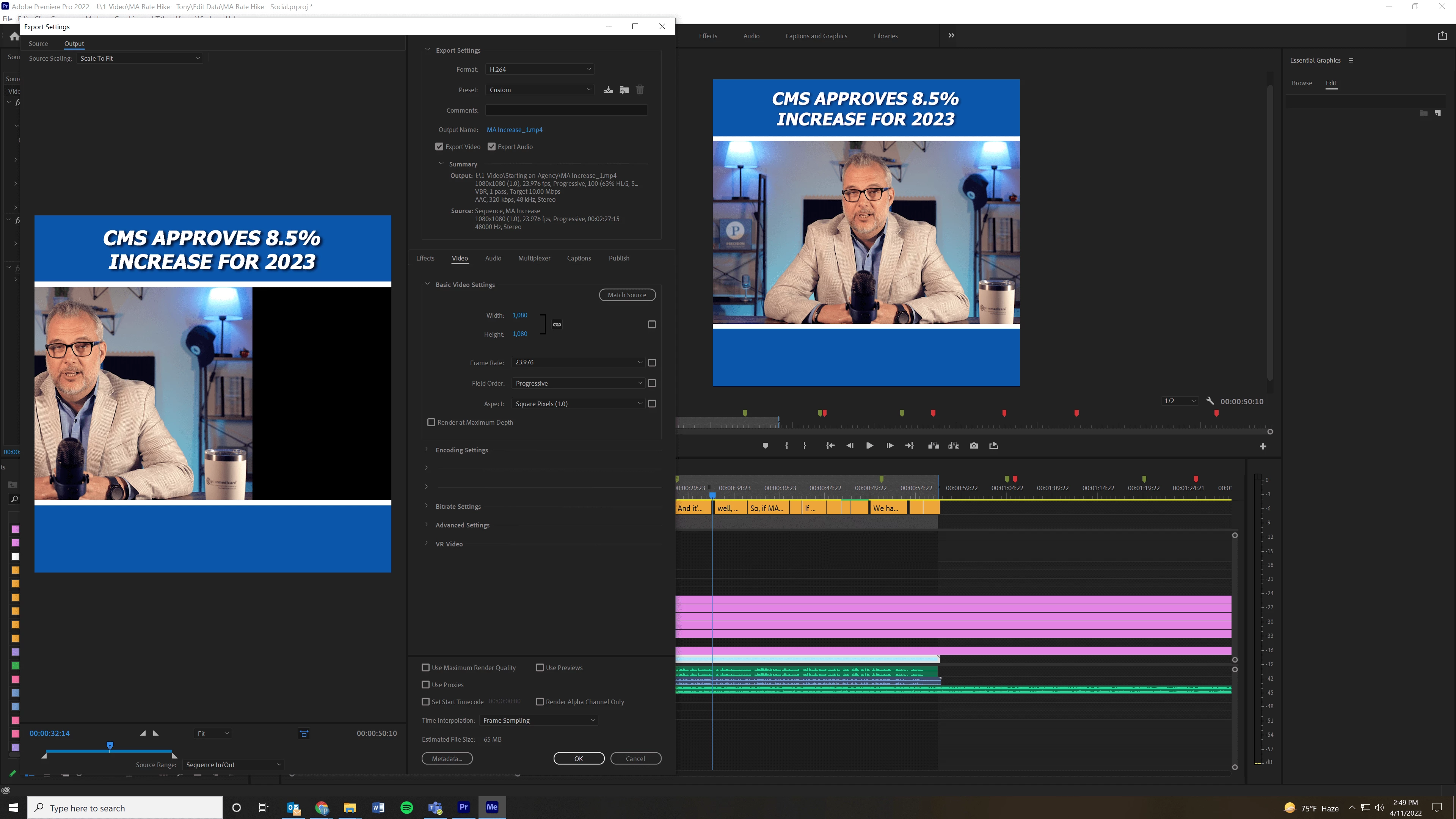
My video is suddenly rendering off center, like in the pic. The source video is fine, no issues.

Tried startng a new project and even opening old projects that redered fine previously, and they do the same. I tried editing evey possible setting with no luck. Everything prints like this, even though the source is fine.

Thanks for any help you can provide.

Shannon

This topic has been closed for replies.

3 replies

Participant
July 10, 2023

Software versions must match.

Participant
November 13, 2023

So I tried rendering my project  video in Adobe Premiere in the software itself, without using AME. Behold it rendered properly! As it was mentioned in this discussion rendering it in AME will likely cause it to be off centered. 

Participant
June 27, 2023

Ok so I have found the solution AE.

When I updated  both AE and ME the issue was gone.

How, why? I don't know.

Participant
July 10, 2023

If After Effects, for example, is at version 25.4 and Media Encoder at version 25.5, it can cause this problem. So when you probably updated both, the problem was gone.

Participant
November 6, 2023

i've used same version of after effect and media encoder. all 2023. but it's still making the video offset. is there anyone can resolve this issues?

Jeff Bellune
Legend
April 11, 2022

Post a screenshot of your export settings, please.

shannond26145410
Participant
April 11, 2022

Sequence and Export settings are attached.


Thank you,

Shannon

sallyf7878992
Participant
June 26, 2023

I am having the same issue, did you manage to reslove this. 

I am exporting from Ae and the image is shifting left and repeating itself on the right.
When I render directy in render queue i do not have this issue


I'm getting excatly the same - started today. I've checked all the settings and tried restarting but no luck.