Inspiring
February 13, 2022
Answered

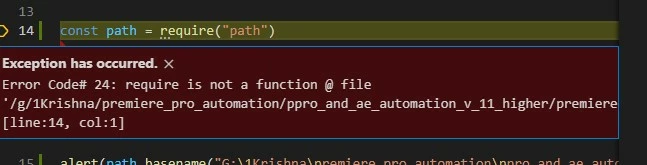
require("path) inside script for knowing the dir ext etc functionality is there way

  • February 13, 2022
  • 2 replies
  • 304 views

Is there way to access the node.js require("path")  inside extended script please let me know. Where i can access the parent directory or ext etc. thanks in advance.
This topic has been closed for replies.
Correct answer Bruce Bullis

Node.js requires JavaScript, and won't work within ExtendScript.


TVMStern's advice about using ExtendScript's File and Folder objects, is sound. 


2 replies

Bruce Bullis
Bruce BullisCorrect answer
Legend
February 14, 2022

Node.js requires JavaScript, and won't work within ExtendScript.


TVMStern's advice about using ExtendScript's File and Folder objects, is sound. 


Inspiring
February 14, 2022

What do you try to do? Are you simply want to know where your JSX lies? There isn't any tools for this task AFAIK because all of scripts lie in operative memory after loading CEP. Look at File class and Folder class. They can help you.


// Get parent folder of file in extendscript
var pathToFile = "/path/to/file.zip"
var fileObj = new File(pathToFile);
var parent = fileObj.parent.fsName; // >> /path/to