yerob31947379
Participant
June 13, 2017
Answered

Resolution problem

  • June 13, 2017
  • 2 replies
  • 267 views

Hey guys !

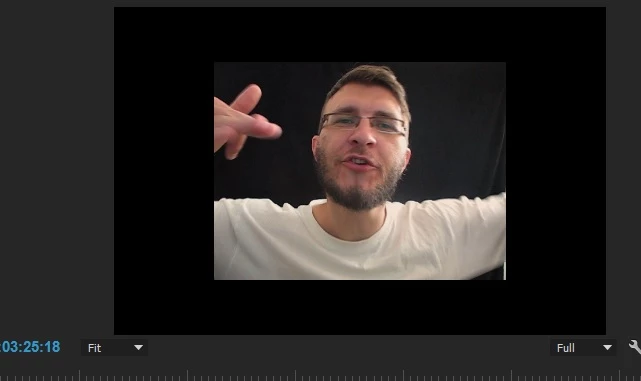
I'm working on video for Youtube . And i have a problem because i working in sequence with resolution 1080-720 . I have ONE video with 1080 720 ( Some Rap clip ) and video TWO ( i am talking about clip) with resolution 640 480 shot with Canon Powershot A630.  Now video clip TWO looking smaller with black frames around . Is there a way to make video TWO looking bigger although its 640 480. This two videos must be in sequence 1080 720  . Maybe a way to zoom in ?

THANKS
    This topic has been closed for replies.
    Correct answer kulpreet singh

    Hi YeroB,

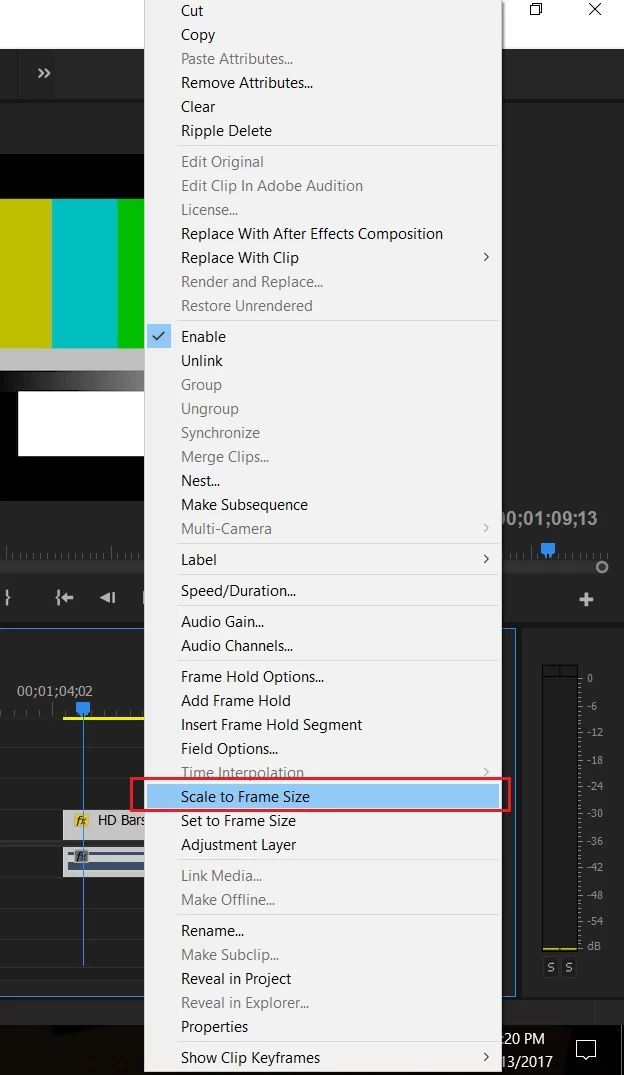
    Right click on your clip (in the Timeline) and select Scale to Frame Size.

    Thanks,

    Kulpreet Singh

    2 replies

    Alemazinger
    Participant
    June 13, 2017

    Maybe it was a typo, but at least you mean 1280x720, your footage is not proportional to youtube standards so even if you apply the scale to frame size feature you're going to have some black frame on the sides.
    Another option is to manually scale to be larger than the frame, but then some clipping will occur.


    Cheers

    kulpreet singh
    kulpreet singhCorrect answer
    Inspiring
    June 13, 2017

    Hi YeroB,

    Right click on your clip (in the Timeline) and select Scale to Frame Size.

    Thanks,

    Kulpreet Singh

    yerob31947379
    Participant
    June 13, 2017

    Thank you !!

    kulpreet singh
    Inspiring
    June 13, 2017

    You are welcome.