


Inspiring
August 18, 2025
Question

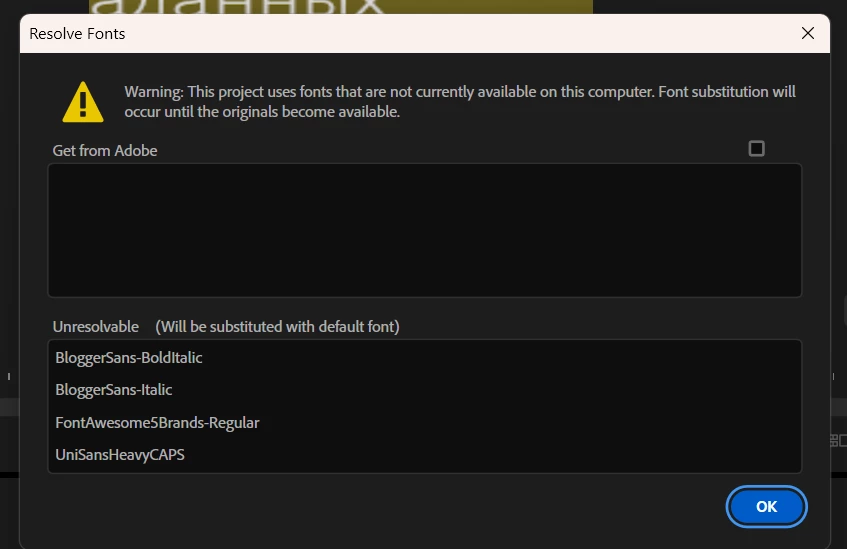
Resolve Fonts
  • August 18, 2025
  • 3 replies
  • 286 views

I do not use these fonts in the project, why do I constantly need this table? Well, I spent time and downloaded these fonts. ? And again this table. Why do you hate users ???????????????? I will not resset the settings every minute, delete Windows, change the keyboard and update the drivers. It's stupid. Do not advise me these nonsense

3 replies

Anna_Lander
Community Expert
Community Expert
August 18, 2025

Just a question. Is it your project from scratch, or do you edit someone else's project? If the second, maybe you could check the text elements using the Essential Graphics panel and change the fonts?

Inspiring
August 18, 2025

This is my project. And add some mogrt files but use my font in them

Intel Core i7-14700K 3.4GHz/33MB s1700 BOX MSI MAG Z790 Tomahawk Max Kingston Fury DDR5-6400 65536MB PC5-51200 be quiet! MSI PCI-Ex GeForce RTX 5070 Ti Gaming Trio OC 16GB GDDR7 SSD Samsung 990 Pro 2TB M.2 PCIe 4.0 x4 NVMe 2.0 V-NAND 3bit MLC SSD Samsung 990 Pro 1TB M.2 PCIe 4.0 x4 NVMe 2.0 V-NAND 3bit MLC Toshiba MG Series Enterprise 20TB 7200rpm 512MB MG10ACA20TE 3.5 SATA III Windows 11 Pro 25H2
caroline_edits
Community Manager
Community Manager
August 20, 2025

Really sorry for this frustration! If you open the Creative Cloud desktop app, you can select "Adobe Fonts" from the right side. Do you see any error messages there? Are the fonts listed in this table available in the Adobe Fonts section of the Creative Cloud desktop app?


I know it's annoying to get an error message for no reason. Let us know if you see these fonts on the desktop app.

Caroline