


Inspiring
November 27, 2024
Question

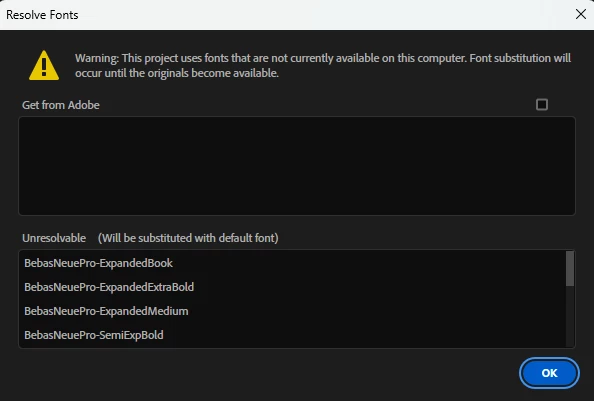
"Resolve Fonts" How to resolve??

  • November 27, 2024
  • 4 replies
  • 2508 views

As you can see from the screenshot below, I have plenty of fonts that are "unresolvable". The question is, how can I resolve this so I dont have this pop up EVERY single time I open up PrP?


I have already gone through and modified the text in the MOGRT files and that seemed to do nothing for me as now those fonts are included on the list.


I wish they would just allow us to dismiss this for good.


4 replies

Community Expert
August 18, 2025

Do you happen to have any After Effects MOGRTs in your project? Those can sometimes cause font-related issues in Premiere Pro, since the fonts need to be available both in Premiere and After Effects for the template to render correctly.

Theresa Rostek
Community Manager
Community Manager
November 27, 2024

Hi @John34495747l9tu,

Sorry you're having some frustration. The dialog box is to alert that fonts are not available on the user's system.


Not all fonts that are named the same will be the same font file. For example, Bebas Neue from Adobe Fonts will be different than Bebas Neue from Google, and different from Font Squirrel. Make sure you have the exact font installed that the ReadMe documentation links to that came with your download. (This will not be the case if you downloaded from Adobe Stock, all Adobe Stock files use Adobe Fonts.)


Without looking at the project file, what I can assume is going on is that there are hidden font layers that use the 5 fonts in the dialog. You can check if you

  1. Open the mogrt in After Effects
  2. Type "missing fonts" into the search bar in the Project Panel.
  3. If it returns any comps, then the versions of Bebas Neue you have are not the specific ones that the project was built with.
  4. To fix, go into the comps, find the offending text layer, you'll know it's the right one when you click on the text layer and it looks like [BebasNeuePro-Extended] in the Character/Properties panel.
  5. Change the font to ones you do have.
  6. Save, export the mogrt, and you should no longer see that dialog box.


Now, if you type in "missing fonts" and the Project panel returns nothing, then we may have a bug. 


Let me know which situation is yours after trying the above steps.


Thanks,

Theresa

MyerPj
Community Expert
Community Expert
November 27, 2024

Thanks @Theresa Rostek 🙂

Harold Silva
Community Expert
Community Expert
November 27, 2024

Entra al link de adobe fonts y actualiza las fuentes 
aqui un link corto de la web de Adobe: http://surl.li/jculjr

Salu2

Harold Silva B.
R Neil Haugen
Legend
November 27, 2024

To resolve that, you add the fonts to the normal font location on your computer. So Premiere can find them.


Everyone's mileage always varies ...
Inspiring
November 27, 2024

I have some of the fonts downloaded and installed throughout but Premiere still does not recognize them and still puts the errors out

R Neil Haugen
Legend
November 27, 2024

Go to your CC Desktop App, the Fonts section, and see what you can do there.

Everyone's mileage always varies ...