Inspiring
September 16, 2023
Answered

Restore mute button

  • September 16, 2023
  • 2 replies
  • 1014 views

My mute button on an audio track has disappeared.  It happened once before and I accidentally found the cure but not this time.  Assistance please.
 

This topic has been closed for replies.
Correct answer Ann Bens
 

2 replies

Ann Bens
Community Expert
Ann BensCommunity ExpertCorrect answer
Community Expert
September 16, 2023
 

Participating Frequently
June 10, 2024

This absolutely doesnt work for me..its only the top track, but no amount of track adjusting or pressing anything changes it..this is the strangest thing, but incredibly annoying. Any one any other other ideas not postulated here?

Ann Bens
Community Expert
Community Expert
June 10, 2024

Post screenshot timeline with header expanded all tracks.

Stan Jones
Community Expert
Community Expert
September 16, 2023

Johnny,


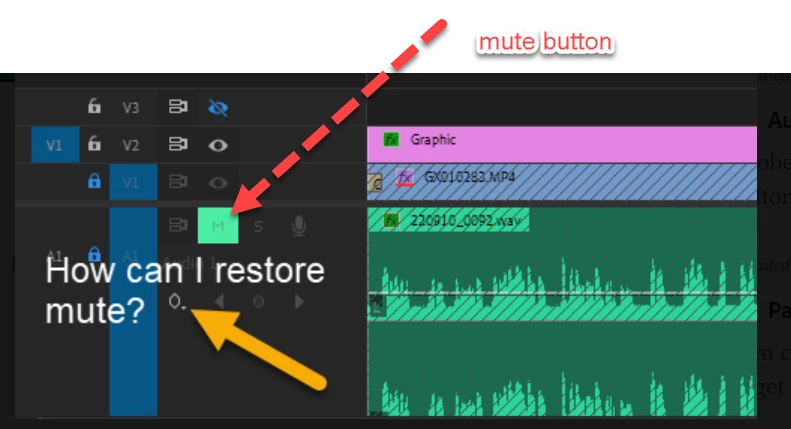
Your mute button is there, just above the arrow. You increased the track height (often done to see the wave form better or use keyframes). Now you can also see the keyframe controls. When you're done with a need for the taller track, just drag it smaller.


Or you can use Alt++ and Alt+- to increase/decrease audio track height.


Stan


JohnnyAirAuthor
Inspiring
September 17, 2023

How did I miss that? 😕😕  Thank you.

Stan Jones
Community Expert
Community Expert
September 17, 2023

lol. Been there done that: it was right THERE just a moment ago....