
Participant
September 17, 2019
Question

RGB artifacts in preview monitor and render with AMD GPU rendering enabled[Windows 10]

  • September 17, 2019
  • 3 replies
  • 746 views

Hey All,


So I've have a strange problem. My preview monitor and renders have these weird artifacts in them. They change whenever you adjust the clip, and go away completely if I change project settings to CPU rendering only. But I kinda need GPU preview and rendering speeds. Any ideas?
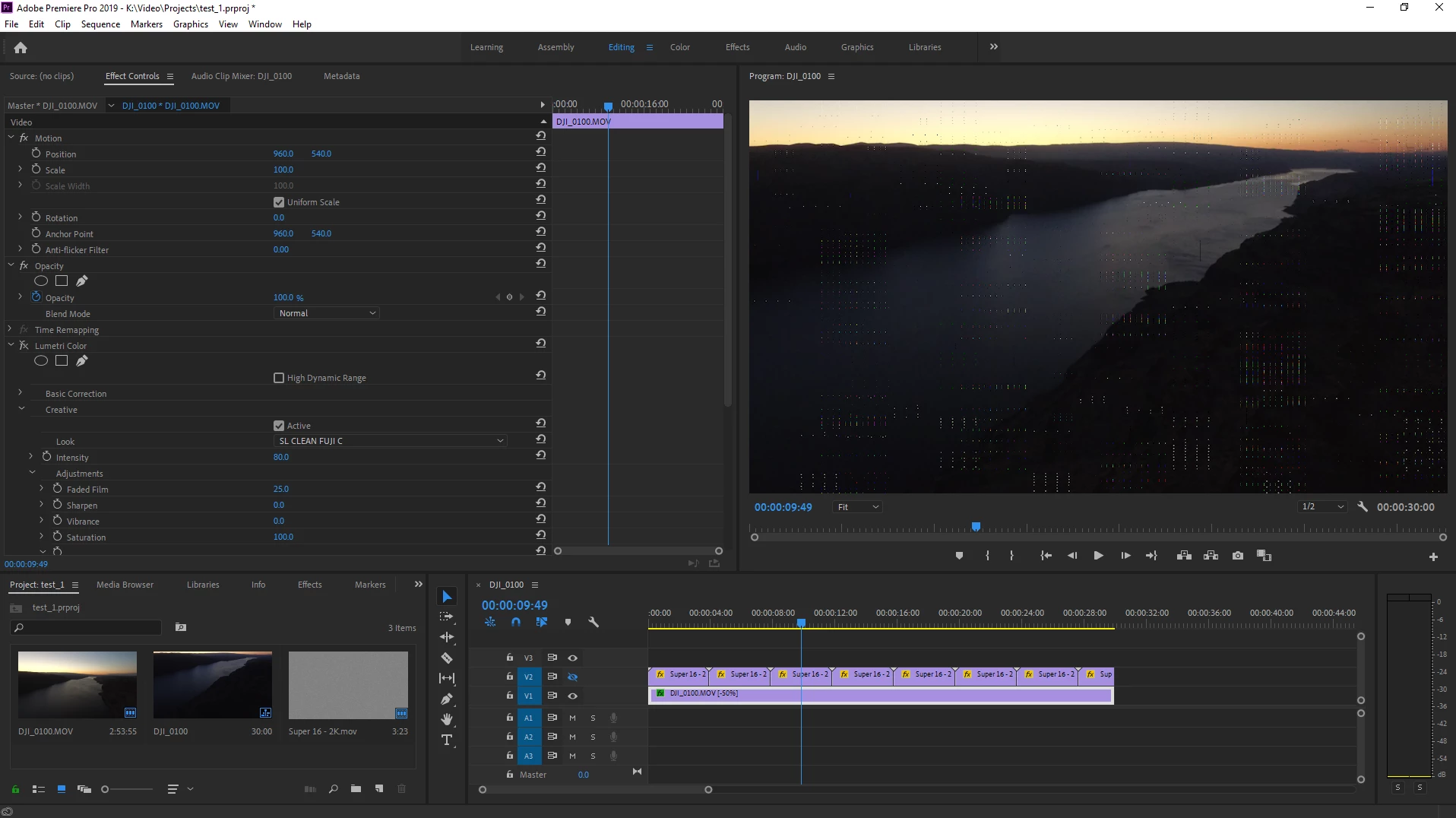
System is Win10 64bit running the lastest version of premiere

GPU is AMD Radeon R9 390 with lastest drivers


Thanks!


Zach

[personal info deleted by mod]

This topic has been closed for replies.

3 replies

Shivangi_Gupta
Legend
September 28, 2019

Hi Zach,


Thanks for reaching out. I agree with @Carlos_Ziade and @Ann Bens. If the preview is fine on the Software only mode, the issue is with the graphics card that you are using, probably.

Did you try the suggestions provided above?


Looking for an update.


Thanks,

Shivangi

Ann Bens
Community Expert
Community Expert
September 17, 2019

Try a previous gpu driver.

Community Expert
September 17, 2019

did you try to update your GPU driver straight from the vendor's website?