Participant
March 21, 2021
Answered

Right-clicking on FX icon on a video clip

  • March 21, 2021
  • 3 replies
  • 485 views

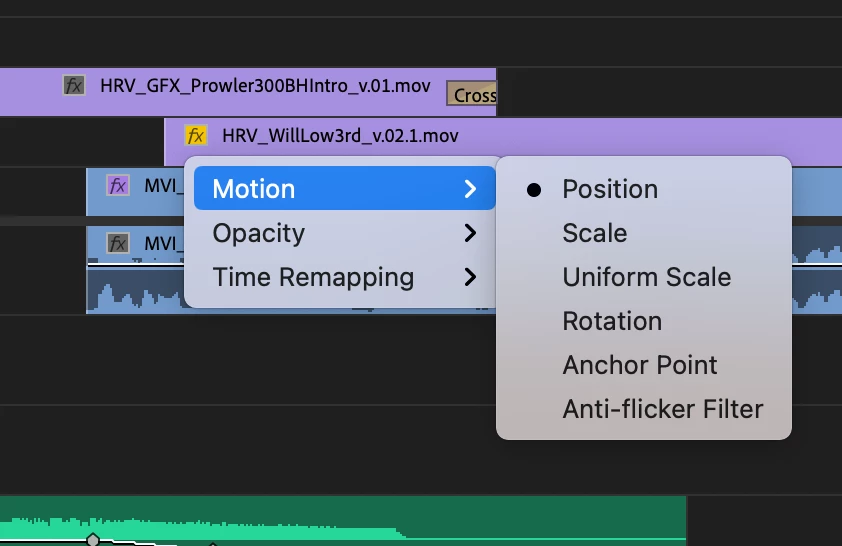
Quick question, when I right-click on the FX icon on a video clip in the timeline, this little menu comes up, but I'm not sure what you can do from here. It looks like maybe it's a quick way to manipulate individual clip parameters, but I'm not sure of how to make use of it. Any help?
This topic has been closed for replies.
Correct answer R Neil Haugen

That would set which parameters you can keyframe directly from the timeline panel itself. You would need to also set the keyboard shortcut for setting a keyframe, and then wherever the CTI is on the timeline, hit that keyboard shortcut and it will create a keyframe at that point on that clip.


Neil

3 replies

BlendeditAuthor
Participant
March 21, 2021

Makes sense.  Thanks, all!

Ann Bens
Community Expert
Community Expert
March 21, 2021

Make sure Show Video Keyframes is on.

Keyframes can be set by using Selection tool + holding down ctrl or the Pentool or use the keyframe option in the header.

Opacity and Time Remapping are the only usefull imo.

R Neil Haugen
R Neil HaugenCorrect answer
Legend
March 21, 2021

That would set which parameters you can keyframe directly from the timeline panel itself. You would need to also set the keyboard shortcut for setting a keyframe, and then wherever the CTI is on the timeline, hit that keyboard shortcut and it will create a keyframe at that point on that clip.


Neil

Everyone's mileage always varies ...