Known Participant
April 9, 2019
Answered

Ripple edit is set as default, I want trim edit as default

  • April 9, 2019
  • 1 reply
  • 2121 views

For as long as I've used adobe Premiere (9 years) trim edit has always been default when using the selection arrow. All of a sudden it has changed to ripple edit whenever I use the selection tool. When I click Command it turns to the Trim Selection.

I want trim selection to be the default when using the arrow key. How do I get this switched back? It's killing me to have it this way.
    This topic has been closed for replies.
    Correct answer Meg The Dog

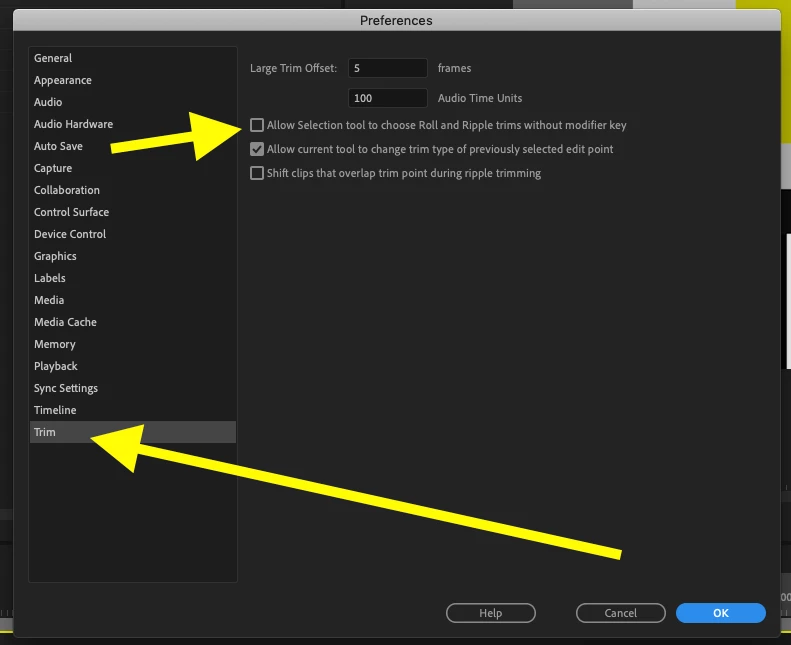
    Go to Preferences > Trim and uncheck "Allow selection tool to choose Roll and Ripple trims without modifier key":

    MtD

    1 reply

    Meg The DogCorrect answer
    Inspiring
    April 9, 2019

    Go to Preferences > Trim and uncheck "Allow selection tool to choose Roll and Ripple trims without modifier key":

    MtD

    Todd KCCOAuthor
    Known Participant
    April 9, 2019

    You are the best! OMG! Just wasted an hour with this. How the hell did that change on its own?