
Inspiring
May 3, 2024
Answered

RX 10 Elements Plugin: User Interface Scalable?

  • May 3, 2024
  • 2 replies
  • 661 views

I am using the "RX 10 Elements" plugin within Premiere Pro CC 2023. When opening the plugin it appears tiny small on my 4K monitor. Is there a way to scale the size of the RX 10 user interface?
This topic has been closed for replies.
Correct answer Ann Bens

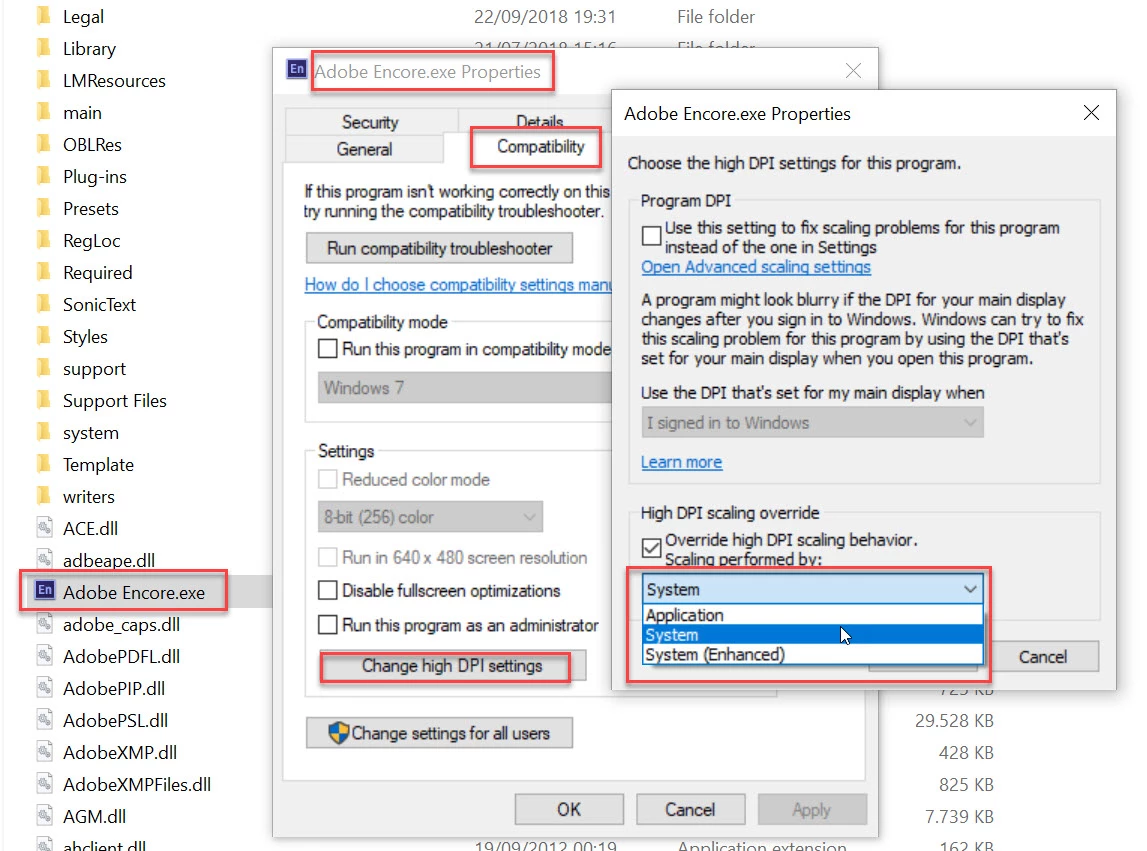
Might want to try this: not sure if this is going to work.

Screenshot is for Encore but change that for your own software


2 replies

Ann Bens
Community Expert
Ann BensCommunity ExpertCorrect answer
Community Expert
May 3, 2024

Might want to try this: not sure if this is going to work.

Screenshot is for Encore but change that for your own software


Inspiring
May 3, 2024

Hi Ann,

thanks very much for providing the solution to my problem! The plugin's user interface is now really big and I can easily see all its options. Hopefully this solution will not interfere with any other features. I will keep my eyes open for it.

Again many thanks,

Wolfram

Mike Dziennik
Community Expert
Community Expert
May 3, 2024

Unless the plugin itself has some settings you can change, there isn't likely much you can do except adjust your OS scaling options to make the entire UI bigger.

Inspiring
May 3, 2024

Mike,

see Ann's comment. She provided the solution which works for me.

Best,

Wolfram

Mike Dziennik
Community Expert
Community Expert
May 3, 2024

Nice. I've not been on Windows for a while now, nice to know you can apply OS level scaling on a per-application basis. Thought you might have to do it globally.