
Known Participant
July 10, 2012
Answered

Sample MCC or SCC File? - Closed Captioning

  • July 10, 2012
  • 2 replies
  • 18128 views

Can anyone either share or point me to a sample .mcc or .scc file for closed captioning?

I got some from my new CC company, but either they don't work, or Premiere isn't doing what it says it does.

I'm hoping someone can point me to a sample file so I can know who's at fault here.

I'm importing the one I have the way you're supposed to (SEQUENCE > ATTACH FILE; then CLOSED CAPTIONING DISPLAY > ENABLE), but nothing ever appears. I'm not sure if I'm doing something wrong, or my MCC files are no good.
    This topic has been closed for replies.
    Correct answer Charles VW

    Hi, I think the issue is simply a matter of timecode, all your files are good.

    In HWHEIGHTS120.scc, the first block of caption data starts at 01;00;00;13, and for sample_rollup_1hr files, the first block of caption data starts at 01;00;00;28.

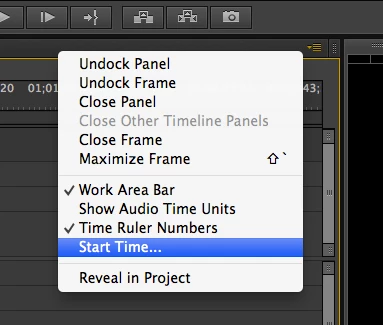
    So, make sure that in your sequence, the playhead is at the proper timecode location.  If you want to adjust the start offset of the sequence, you can do that via the Sequence panel's flyout menu (look in the upper-right corner of the panel), and choose "Start Time"

    If you don't know when the first caption is in your file, you can just open any .scc or .mcc file in any text editor, and the timecodes are easy to read.

    Once you get this up and running, let us know how it goes for you, and what sort of Closed Captioning features you'd like to see in the future.

    2 replies

    Participating Frequently
    July 11, 2012
    Known Participant
    July 11, 2012

    The problem was indeed the start time.

    Not sure why they gave me a file with timecode that starts an hour into the show, but nevertheless, I REALLY apprecaite you finding the solution for me, Charles!

    Thank you!

    Participant
    May 6, 2014

    It's because the conventional timecode for a broadcast/tape program starts at 1;00;00;00 not 0;00;00;00, so your tape would start somewhere at 0;58+ with black, bars/tone, slate; then at 0;59;50;00 comes the countdown leader which ends in 2 sec black, and program lines up exactly at 1;00;00;00   Not sure why the convention, but I suppose it was to avoid having negative timecodes.

    Known Participant
    July 10, 2012

    Ok, for the life of me I cannot get my closed captioning files to work.  I got these files from my closed captioning company to try out in Premiere today. But I can't get them to work at all.

    http://dl.dropbox.com/u/49190831/sample_rollup_1hr.scc

    http://dl.dropbox.com/u/49190831/HWHEIGHTS120.scc

    http://dl.dropbox.com/u/49190831/sample_rollup_1hr.mcc

    I would appreciate it A LOT if someone out there could try these files out and see if you can get them to work. These are directly from the closed captioning company.

    Do these actually work in Premiere CS6? What am I doing wrong?

    Charles VW
    Charles VWCorrect answer
    Inspiring
    July 11, 2012

    Hi, I think the issue is simply a matter of timecode, all your files are good.

    In HWHEIGHTS120.scc, the first block of caption data starts at 01;00;00;13, and for sample_rollup_1hr files, the first block of caption data starts at 01;00;00;28.

    So, make sure that in your sequence, the playhead is at the proper timecode location.  If you want to adjust the start offset of the sequence, you can do that via the Sequence panel's flyout menu (look in the upper-right corner of the panel), and choose "Start Time"

    If you don't know when the first caption is in your file, you can just open any .scc or .mcc file in any text editor, and the timecodes are easy to read.

    Once you get this up and running, let us know how it goes for you, and what sort of Closed Captioning features you'd like to see in the future.