
Saturation is still incorrect (Pr CC 2017)
In the example below I have applied a similar amount of saturation in premiere and Photoshop (by taking a screenshot):
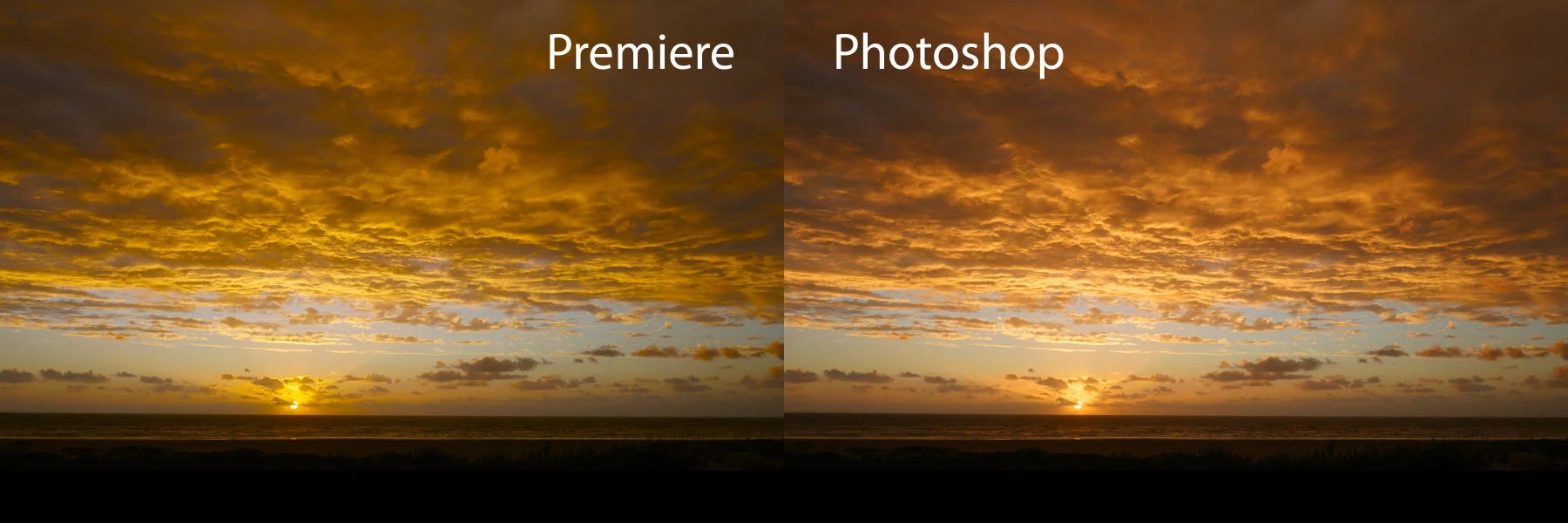
Why is the saturation slider in Premiere Pro CC 2017 (still) behaving weird?
I recently upgraded from CS6 to CC, and immediately noticed how ugly the colors became when I wanted to add some saturation to this sky.
Basically it just makes a total mess of the colors. It looks like it's been peed on...
It is not that it only yellow shifts, it does more weird things.
The only solution I could find was using one of the 'creative' film simulation presets to get more saturation without messing it up.
I found a topic by Dave Dugdale from 2015, and apparently this still has not been fixed.
What?? Am I missing something? Is there a workaround, a checkbox in the preferences or something?
The footage is a non-lut GH4 time lapse MP4.
 AdChoices