
xaci_68
Inspiring
November 10, 2019
Question

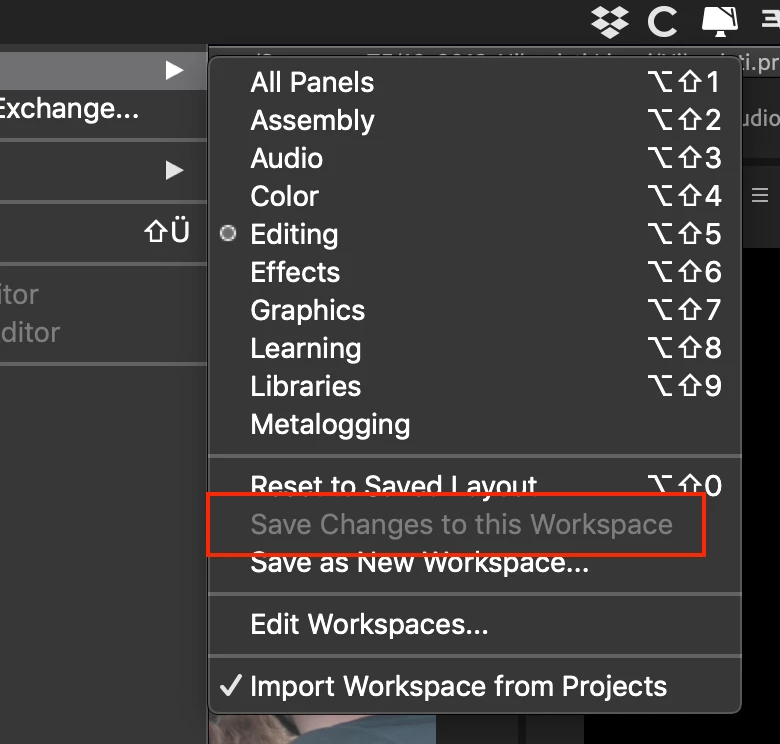
"Save changes to this workspace" is greyed out

  • November 10, 2019
  • 2 replies
  • 3184 views

Hi guys,

after updating to PP 2020, I cannot save any changes to the existing workspaces no more: the save option is greyed out.

I though it was a cloud sync/connection proble, but I'm connected (no the faster connection here, though)

Any suggestions?


Thanks,

Alessandro.

2 replies

xaci_68
xaci_68Author
Inspiring
November 10, 2019

Yes it is. Specifically the editing workspace.

Of course I saved in a personalize WS, but in the previous versions was possible to edit and save the standards as well. So, it looks like to be a change from this point of view.

Not a big deal, but I'm just wondering why. 🙂


Anyway, thanks for your answer 🙂

Participating Frequently
December 3, 2019

Not sure why Adobe would've done this.  Seems like a bug to me. Now I have to go through each of my workspaces and save as a new one in order to make changes.  Updates are always fun.

Ann Bens
Community Expert
Community Expert
December 3, 2019

No its not a bug. People were complaining not being able to go back to the default workspaces.

Ann Bens
Community Expert
Community Expert
November 10, 2019

If its a Premiere standard workspace: yes that is correct.

If you made changes: Save as new workspace.

Participating Frequently
December 3, 2019

But the key here is that it wasn't this way before 2020.  You were able to make changes to provided workspaces and save as your own version.