
tranhoangcalvin
Known Participant
February 18, 2026
Question

Saving frame from Source Window doesn't match saving frame from Program Window

  • February 18, 2026
  • 2 replies
  • 22 views
^^^ Source Window EXPORTED FRAME: crazy blown out


^^^ Source Window, screenshotted (Windows+Shift+S) - so this is what the Source Window LOOKS LIKE to me as I’m working
^^^ The same clip in my program monitor in my timeline (no effects added onto the clip in the timeline) -- EXPORTED FRAME

Can someone explain why when I export the frame from the Source Monitor that it comes out looking blown out? It doesn’t look like that in the User Interface of Premiere.

I have some lumetri color correcting going on in the source, so there’s no difference between the source and the program.

Turning off the lumetri effect on the source clip, I get this as an exported frame:

But this as a screenshot of the UI in Premiere:

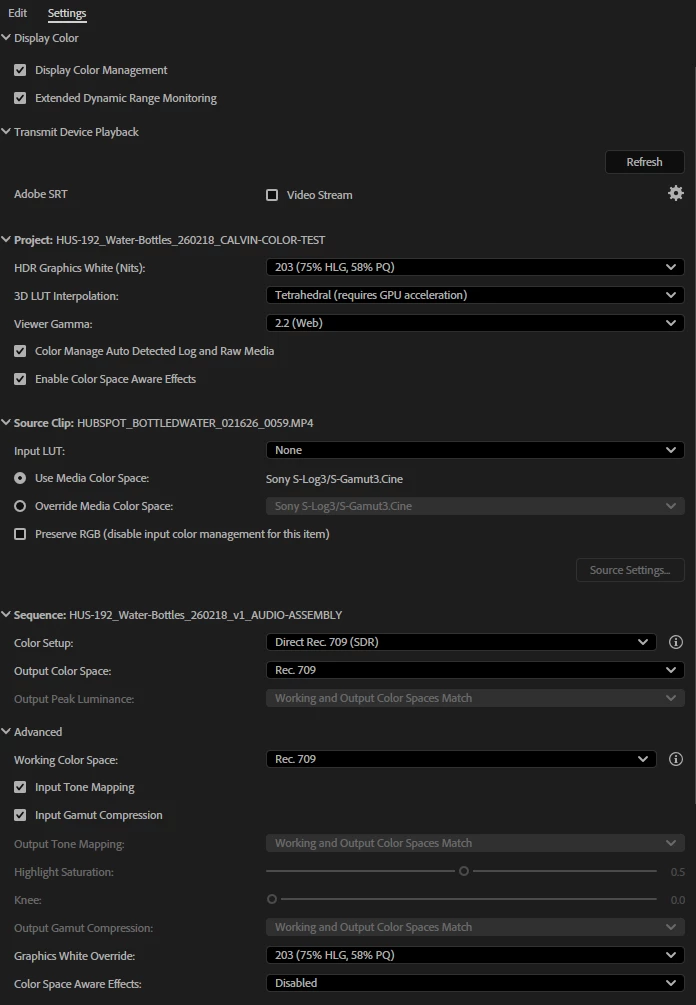
 Here are my lumetri settings:
 

2 replies

MyerPj
Community Expert
Community Expert
February 18, 2026

As ​@R Neil Haugen was saying, they do export different. For instance I have a 4K clip on my HD timeline, the clip is set to Fit (50% scale). When I export from the Program monitor I get an HD .png. When I export the same frame but from the source monitor, (both set to ‘fit’ for display) the full frame exports and does look different than the other one.

R Neil Haugen
Legend
February 18, 2026

In the blown-out one, you’re getting the image pre-color management ... as unless you apply a correction to the clip in the bin, the Source will show different than the Program ... note their names, right?


One question ... did you check the input tonemapping and input gamut compression in the Advanced section, or were those set that way when choosing the Direct Rec.709 Sequence space?

Everyone's mileage always varies ...
tranhoangcalvin
Known Participant
February 18, 2026

I’m not sure I follow.

The blown out one is what I get when I hit “Export Frame” from the source window. The lumetri color effects are being applied to the clip’s source (in the bin, I believe is what you’re saying).

But 1) it doesn’t look at all like that in the source window. It only looks blown out when I hit “Export Frame”

and 2) what I see in the source window looks identical to what I see in the Program window, which is also identical to what the “Export Frame” button in the Program window punches out.

Why would there be this difference?


I believe those two checkmarks were on automatically. But that shouldn’t impact it, right? Those only apply to clips in the sequence timeline.


R Neil Haugen
Legend
February 19, 2026

I think what we would expect would be the export frame from the Source window would export what we see … I agree there.


I’m also wondering what the Source monitor’s color management is set to show … the wrench menu, Monitor Color Management.

Everyone's mileage always varies ...