Participating Frequently
April 10, 2013
Question

Saving Media Cache to External Hard Drive

  • April 10, 2013
  • 4 replies
  • 24242 views

I have a very large project for my senior thesis film that I am editing in Premiere Pro CS6. I have all 200GB of video files organized on my external hard drive.

I use my laptop, my co-editor's laptop, and several of the school's Macs to edit. Each time I use one of these computers, the project has to conform the audio and generate a peak file, which is very time consuming. Often, it will also make me locate several of the video files form my project (sometimes all of them), which is also an issue.

I finally figured out the language of this to find in the forums that some people suggested changing the Media Cache files and the Media Cache Database to the external hard drive. When I contacted Adobe Live Chat, the representative cautioned me not to do that because:
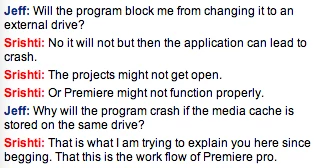
So allegedly, that will break the workflow of Premiere Pro...

Instead, they had me go into Project>Project Manager and change the settings for "Resulting Project" from "Create New Trimmed Project" to "Collect Files and Copy to New Location."

This results in all of the video files that I have imported into the project being copied to the same folder that the project file is in. This seems counterintuitive because all of my video files and media are located on the same external hard drive already.

This is what I would like to redirect to my external hard drive:
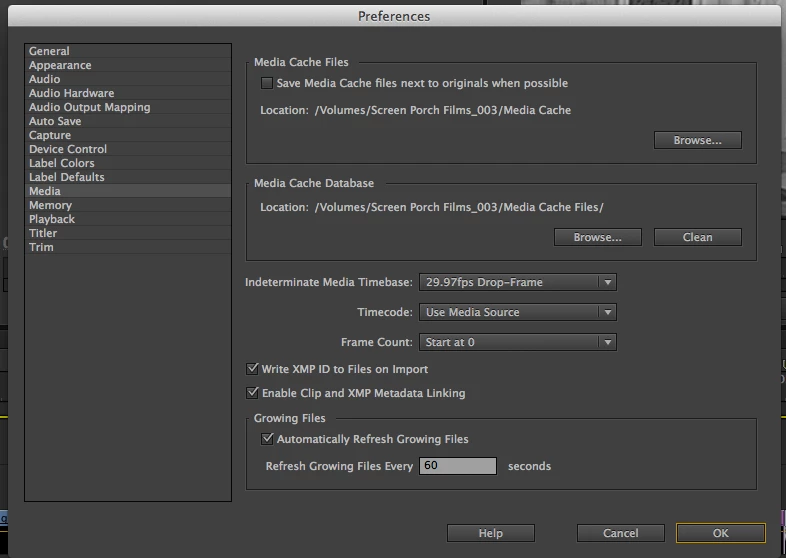
My question is this: Are there any risks with saving the Media Cache files and the Media Cache Database to the external hard drive? Was the representative correct in that it can cause the project and Premiere to crash and not open?

This topic has been closed for replies.

4 replies

Inspiring
October 14, 2018

I have a related question - I've got my Media Cache files set to save to a different internal hard drive to my system drive - so they're all getting saved to a spare 250GB internal SATA SSD - that's totally fine, right?

Ann Bens
Community Expert
Community Expert
October 14, 2018

Yes

Inspiring
April 10, 2013

[post rendered irrelevant and hence removed]

Legend
April 11, 2013

joe bloe premiere wrote:

[post rendered irrelevant and hence removed]

Really?  I refrained from answering because I thought you covered it perfectly.

Participating Frequently
April 11, 2013

Yeah, why delete something that could have helped someone else who comes across this thread down the road? That was very informative, even if it didn't directly apply to my exact situation.

Legend
April 10, 2013

I would be surprised if that were true.

Participating Frequently
April 10, 2013

Jim, you would be surprised if moving the Media Cache does crash Premiere Pro? Have you had/heard of any experience where someone tried this?

jstrawn
Community Manager
Community Manager
April 10, 2013

Have you had/heard of any experience where someone tried this?

Yes. I just tried it. = no crash

jstrawn
Community Manager
Community Manager
April 10, 2013

I think he/she was just saying that that's not really an intended workflow, so if it DOES crash or lead to other problems, ppro can't really be responsible for that.

I dont know of any open issues where the app will crash or badly misbehave if you change the location for Media Cache Files to an external drive or elsewhere. But your media cache directory already different from your project and/or media directory by default, so I don't fully understand your goal... Is it to have all the media cache files off of you c <root. drive to save space?

Participating Frequently
April 10, 2013

JStrawn,

I would like to carry the Media Cache aroudn with me so that I do not need to render, conform, and locate my media every single time that I load the project. I open the project on multiple computers and each time, I have to go through these tasks. I never had this issue every time that I opened a project in CS3, CS4, or CS5. Does that make sense?

the_wine_snob
Inspiring
April 10, 2013

I use external HDD's often, to migrate my projects between my PC's (laptop and workstation), BUT set up my Projects with Copies of all Imported Assets, and Media Cache (all Scratch Disks) that way initially. I have never tried to move things around, after a Project has been started (I would explore using Project Manager for such a task). On my PC's, each external HDD is set to the same exact drive letter, in the OS of each computer. With Mac's, that is very similar to "Volumes," but I think that there are some differences. Sorry, but I am a PC-only guy, so maybe a Mac-person can direct you better in that regard. To date (remember, I do this in the initial setup), I have had no lost Renders, CFA's, PEK's, or any crashes, or hangs.

Good luck,

Hunt