
mohamedh78426672
Known Participant
February 6, 2021
Answered

Scaling option dosen't appear on effect control

  • February 6, 2021
  • 3 replies
  • 3141 views


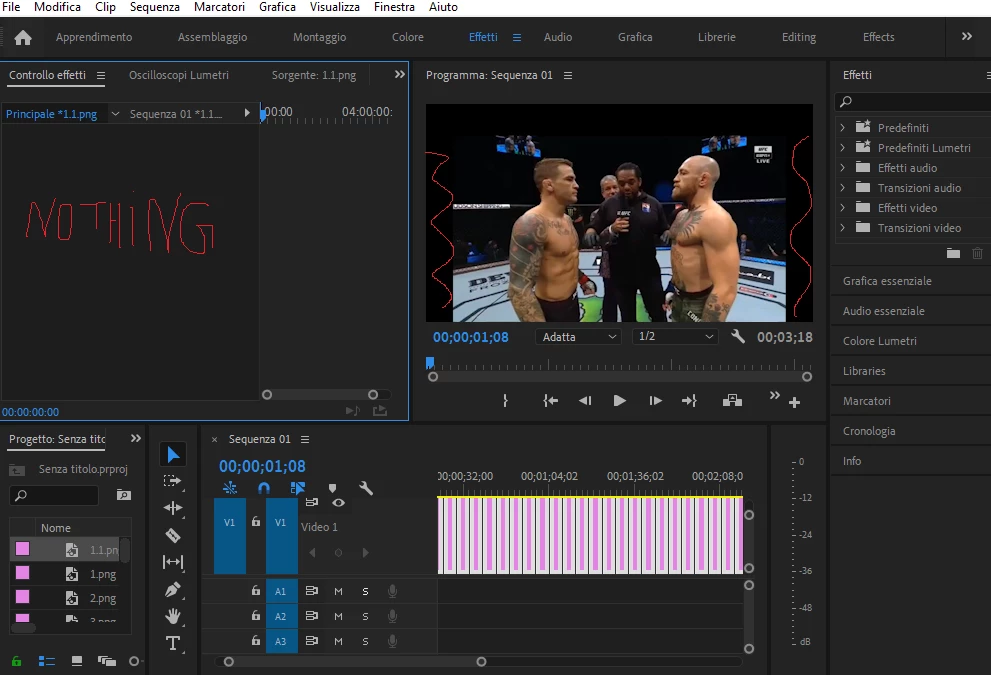
When i click the single image of the sequence the option to scale it and remove the black space on the left and on the right dosent appear, any help? Also i'm looking for an option to be able to make every image fit the screen for every corner, any advice? The images are screen shots, when i used the "scale to frame size" option, some images still had black space at the sides...thank you
 

This topic has been closed for replies.
Correct answer Phillip Harvey

You can't change the clip properties in Effect Controls for multiple clips simultaneously. It looks like you have everything in your timeline selected. Select one clip and you can see the properties.  


If you need to change them all to be a certain value you can make the adjustment on one clip, then copy the Motion properties (or whatever it is) from that clip and paste it onto all the other clips. Another way would be to select the clip in the timeline and then select the rest of the clips in the timeline, right click, paste attributes, and choose what you want to paste. Both methods are similar.

3 replies

Community Expert
February 7, 2021

When pasting effects or attributes make sure you don't paste to your origional clip. With lots of small clips it's easy to select the wrong ones and double paste the effects (ask me hoe I know!)

Phillip HarveyCommunity ExpertCorrect answer
Community Expert
February 7, 2021

You can't change the clip properties in Effect Controls for multiple clips simultaneously. It looks like you have everything in your timeline selected. Select one clip and you can see the properties.  


If you need to change them all to be a certain value you can make the adjustment on one clip, then copy the Motion properties (or whatever it is) from that clip and paste it onto all the other clips. Another way would be to select the clip in the timeline and then select the rest of the clips in the timeline, right click, paste attributes, and choose what you want to paste. Both methods are similar.

mohamedh78426672
Known Participant
February 7, 2021


great way to save time than you! and yes they were all selected didn't knew i couldn't do it

Stan Jones
Community Expert
Community Expert
February 7, 2021

You need to click the .png in the timeline (to the right of "Video 1" track; not in the Project Panel.


Are all the .png's the same pixel size? Did you apply the scale to all the images?


Stan

mohamedh78426672
Known Participant
February 7, 2021


i resized the screenshots with paint but they are not same pixel size! Next time i will make them same size so it's less work on premiere, thank you.

What size should i make them so once i open them in premiere i can make them full screen?

thank you