
Known Participant
August 26, 2017
Answered

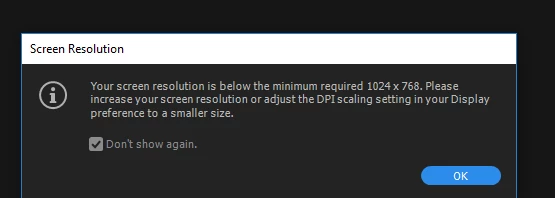
Screen resolution error message

  • August 26, 2017
  • 4 replies
  • 14093 views

Every time I open Premiere Pro CC 2017 this message always pops up saying "your screen resolution is below the minimum required 1024 x 768. Please increase your screen resolution or adjust the DPI scaling settings in your display preferences to a smaller size."

On my compute under Resolution it says 1366 x 768 (Recommended). Operating System is Windows 10 and its a Lenovo ideapad 11015ISK

Can someone please help me?
This topic has been closed for replies.
Correct answer Peru Bob

That laptop is not powerful enough for Premiere Pro.  Even if it could be upgraded, it would not be cost effective,

I would advise you to save up for a new computer..

4 replies

Known Participant
August 28, 2017

Here`s the information about my Laptop.

Peru Bob
Community Expert
Peru BobCommunity ExpertCorrect answer
Community Expert
August 28, 2017

That laptop is not powerful enough for Premiere Pro.  Even if it could be upgraded, it would not be cost effective,

I would advise you to save up for a new computer..

Participant
July 13, 2021

these are my computer specs. is my computer good enough to use premiere? I cant figure this thing out

Bill Gehrke
Inspiring
August 27, 2017

Besides the screen resolution that unit only has 6 GB of RAM where Premiere Pro minimum is 8 GB, and also that single 1 TB disk drive is a puny 5400 RPM.

Have you considered Premiere Elements it may work on that extremely weak compute capability.

Known Participant
August 27, 2017

What do you mean by Premiere Elements?

Community Expert
August 27, 2017
Legend
August 26, 2017

I recommend nothing less than a 24" screen with 1920 x 1080 resolution for editing.

Known Participant
August 26, 2017

Heres the other resolutions that are listed on my computer

Ann Bens
Community Expert
Community Expert
August 26, 2017

Your screen is too small whatever resolution you choose.

Read the system requirements.

Ann Bens
Community Expert
Community Expert
August 26, 2017

Actually its 1280x800 (Adobo has not changed the error message yet).

Your screen is 32 pixels short. You need a bigger screen.

System requirements Premiere Pro and older